SKU: 75061046696
briers gardening gloves

briers gardening gloves Briers Advanced SuperGrips Gardening Gloves

Sale price$22.24 Regular price$24.71
Save 10%

Pay in installments of $6.18 with ShopPay, AfterPay and Klarna

Shipping Estimate
USA
  • USA
  • CAN

Ships within 48 hours · Estimated delivery Sep 29 - Oct 4

Promo Codes Available:

For Your Every Summer RSVP, with Code: SUMMER15

Description

briers gardening gloves Briers Advanced SuperGrips Gardening GlovesThere's a particular kind of garden day that isn't really gardening at all it's building. Raised beds being constructed. Edging being laid. Paving slabs lifted into place. Sleepers carried two at a time. Bags of sand, ballast, or compost shifted from delivery pile to project. The pleasant rhythms of pruning and weeding feel like a different sport entirely, and you need a different pair of gloves for it. These are the pair. Built around the textured

There's a particular kind of garden day that isn't really gardening at all — it's building. Raised beds being constructed. Edging being laid. Paving slabs lifted into place. Sleepers carried two at a time. Bags of sand, ballast, or compost shifted from delivery pile to project. The pleasant rhythms of pruning and weeding feel like a different sport entirely, and you need a different pair of gloves for it.

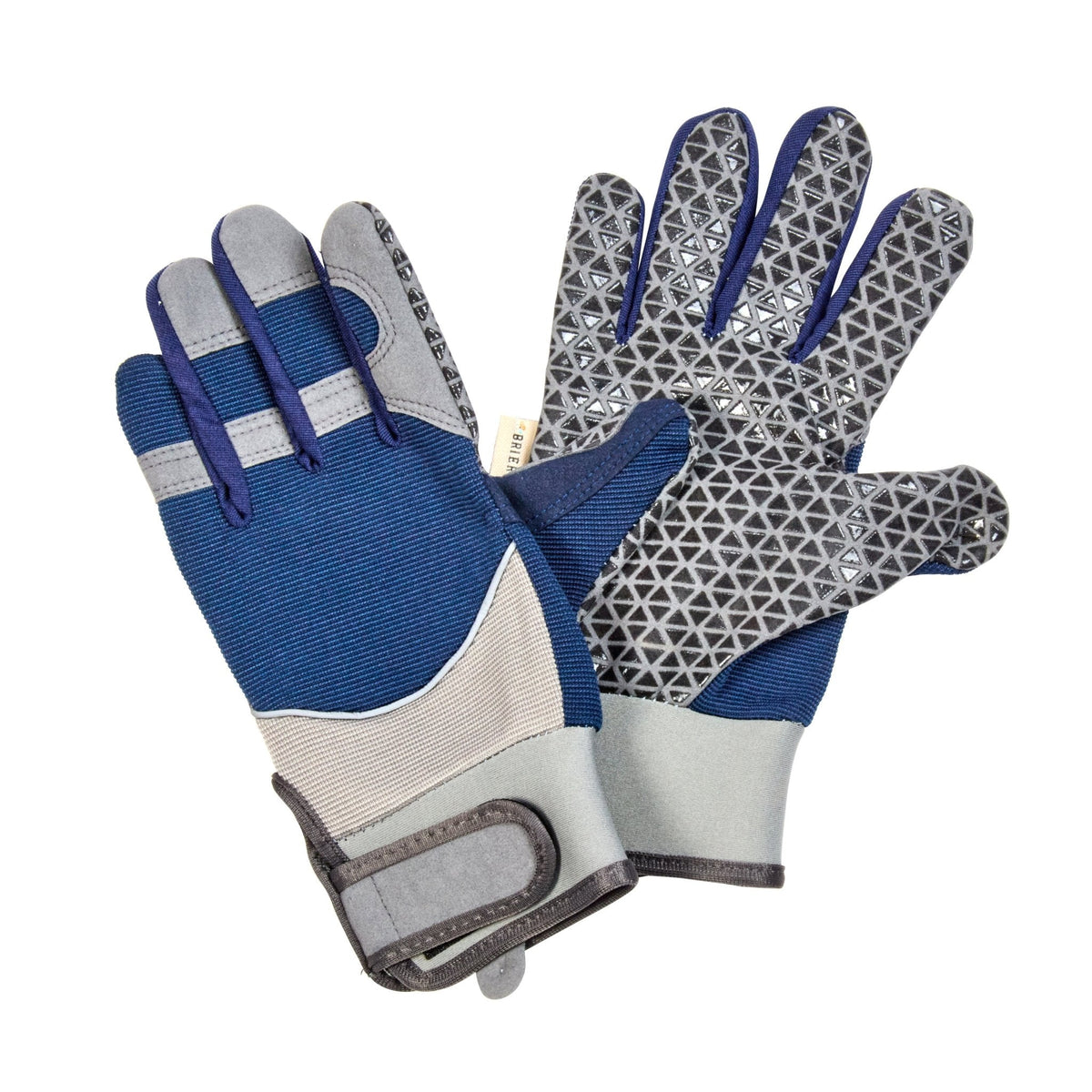
These are the pair. Built around the textured SuperGrips palm and finger pattern that gives proper purchase on the things gardening rarely demands — timber, stone, masonry, smooth plastic, damp tool handles. With a shaped wrist guard for the moments when the load shifts and the wrist takes the strain.

Made by Briers, a long-established British glove maker. Supplied to us through our partners at AllotMate, who curate proper, well-made tools and equipment for gardeners and allotmenteers who'd rather buy once.

What makes them work

This pair is built for the heavy, hands-on grunt work that turns garden plans into finished gardens:

  • SuperGrips textured palm and finger pattern — the standout feature. Pronounced grip texture gives excellent purchase on tools, timber, stone, paving, and damp surfaces where standard glove palms slip. Lift heavy things with less effort and more confidence
  • Shaped wrist guard — adds support and helps protect a vulnerable area during repetitive lifting and carrying
  • Reinforced panels at high-wear zones — extends life through repeated heavy use
  • Breathable back — heavy work generates heat, and breathable gloves stay comfortable far longer than insulated ones during physical sessions
  • Elasticated cuff with adjustable strap — creates a tidy seal that keeps soil, sand, gravel, and debris out as you work around landscaping projects
  • Genuine dexterity despite the protection — switch from lifting a slab to handling a screw or tool without peeling the gloves off

The combination of strong grip and wrist support makes these particularly well-suited to the structural and landscaping work that's harder on hands than ordinary gardening — and where the wrong gloves cost you finish quality, time, or a knuckle.

When you'll reach for them

These come into their own for the building, lifting, and landscaping work that punctuates a properly active garden:

  • Building raised beds — handling sleepers, screwing corner brackets, lifting filled bed sections into place
  • Laying edging — moving stones, paving setts, metal edging panels, brick on edge
  • Shifting bags of compost, sand, ballast, gravel, woodchip — the deliveries that arrive in 25kg sacks and have to get from drive to where they're needed
  • Moving pots in volume — particularly the larger glazed pots that combine slippery surface with significant weight
  • Path and patio work — laying slabs, lifting old paving, shifting rubble
  • Timber work — fence posts, trellis frames, pergola components
  • Compost bay and structure-building — anything where stone, wood, and weight come together

For everyday lightweight work, our Briers Advanced Performance Gardening Gloves are the better pair. For long pruning sessions and repetitive tool work, the Briers Advanced Grip & Protect pair has fingertip padding that earns its keep. For wrist support during the kind of repetitive motion that gradually wears the joint, the Briers Advanced Protect pair has a dedicated neoprene wrist guard. These are specifically the heavy-lifting and landscaping pair — when grip on hard materials matters more than anything else.

Choosing between the Briers range

The honest summary across the Briers range we stock:

  • Advanced Performance — the lightweight everyday pair. Maximum dexterity, breathable, for fiddly work and general maintenance
  • Advanced Flex & Protect — everyday with knuckle protection. Good when general work includes some shrub-pruning or rough-stemmed plants
  • Advanced Grip & Protect — heavy-duty with fingertip padding. For long pruning sessions, digging, and repetitive heavy tool work
  • Advanced Protect — the wrist-support pair. Dedicated neoprene wrist guard for repetitive work where wrist fatigue is a concern
  • Advanced SuperGrips (these) — the heavy-lifting pair. Textured grip for landscaping, building, and shifting hard materials
  • Advanced All-Weather — for cold, wet, and winter conditions. Fleece-lined, water-resistant

If your gardening regularly includes building or landscaping projects — even small ones, like laying a section of edging or building a single raised bed — these are the pair that turns a frustrating job into a finishable one. Particularly worth pairing with the Performance gloves: the Performance pair for the planting and finishing work, this pair for the heavy moves.

Sizes

Available in three sizes:

  • Medium — for smaller to average hands
  • Large — for average to broader hands
  • Extra Large — for broader hands, or those who prefer a roomier fit

For heavy-lifting gloves, a slightly snugger fit gives better grip control than a loose one — but not so tight that the textured pattern presses uncomfortably during longer sessions. If you're between sizes, size up rather than down for comfort over hours.

Looking after them

Heavy-use gloves earn longer life with a bit of care:

  • Rinse by hand after mucky jobs — particularly important after concrete, mortar, or cement work, which damages glove materials if left to set
  • Shake out well to remove sand, grit, and debris that can wear the inner lining
  • Air dry away from direct heat — radiators ruin the grip texture's elasticity
  • Open the wrist strap when storing so the elastic doesn't compress permanently in one position
  • Check the grip texture occasionally — when it starts to feel smooth and worn, the gloves have done their work and a fresh pair is due

Treated this way, these will see you through several substantial garden projects.

About Briers

Briers are a trusted British brand specialising in practical garden gloves and protective wear. They've built their reputation on producing reliable, season-appropriate gloves at fair prices — not flashy, not gimmicky, just well-designed kit that does what gardeners actually need it to do. We stock their range because the simple practical things in a garden often matter most.

About AllotMate

AllotMate curate proper, well-made tools and equipment for gardeners and allotmenteers who'd rather buy once than buy often. We work with them through a direct fulfilment arrangement, which means your order ships from their warehouse to your door — same Briers gloves, slightly faster delivery, and consistent stock levels because they handle their own inventory.

Specifications

  • Palm: textured SuperGrips pattern for excellent grip on hard and smooth materials
  • Fingers: same SuperGrips texture extending across finger contact points
  • Back: breathable for heat release during heavy work
  • Wrist: shaped wrist guard for support, with elasticated cuff and adjustable strap
  • Reinforcement: panels at high-wear zones for durability
  • Sizes: Medium, Large, or Extra Large
  • Use: heavy lifting, landscaping, building, structural garden work
  • Made by: Briers
  • Supplied through: AllotMate

A small thought: the difference between a half-finished landscaping job and a properly finished one is sometimes nothing more than whether your hands could grip what they were holding for long enough. Decent grip gloves are a small upgrade with a disproportionate effect on whether the project gets done — and on how good your hands feel afterwards.

Shipping Notes
  • Free Standard Shipping on $100+ Orders to the USA.
  • Except Preorder products are shipped in 48 hours.
  • Delivery to the USA:
  1. Standard Shipping : 3-10 business days
  • If time is of the essence, please consider selecting expedited delivery for faster service.
Exchange/Return Notes
  • We offer a 30-day return/exchange service after receiving.
  • Final sale items are not eligible for returns or exchanges.
  • To process your return/exchange, please contact us at [email protected]
  • Please click here for more details>>> Return & Exchange Policy
SKU: 75061046696

Discover Niche Categories That Outsell briers gardening gloves

Top-Converting Item to Boost Your Average Order

4.0 ★★★★★
Based on 5 reviews
Sort
Highest Rating
Newest First
Oldest First
Product Reviews
A
Verified Purchase
Anymuon
Battle Creek, US
★★★★★ 5
Bad auto driver install. Great mouse. Few of the left hand mfgs.
Style: Left-Handed, Pattern Name: Mouse, Color: Graphite
Really crappy auto driver install. Locked up my USB ports for my usb keyboard, usb mouse, all usb ports in fact. Had to reboot multiple times with an old style 5pin keyboard since the software screwed up my usb ports. All of them. Lucky I have a motherboard with an old style keyboard port. A reboot of W11 in safe mode, ripped out auto-installed software, registry keys and rebooted to regain control of my USB ports. I do not know what went wrong. Alls I know is Logitech loaded something, it locked up my USB ports and I had to rip everything Logitech out to get control again. I downloaded the software, installed it and it worked fine. I've had no problems since. I'm an old lefty and as such am ambidextrous in most areas, since there just was not left handed oriented items readily available. You had to have left handed stuff made so you learned to do things right handed. I've developed carpal tunnel in both elbows and had purchased a couple of vertical mice, one left and one right. I took the left into work and was looking for a replacement. My other two were around $30 ea. I liked the right handed vertical mouse (Anker). They do not make a left handed version. The left handed mouse is ok, not as good as the Anker. I decided to go above my spend tolerance and get the Logi after reading many reviews. It has not disappointed me. The auto-install sucked. Never letting that happen again. It is a nice smooth mouse. Fine movements that are easily adjustable. The hand position is excellent. I can use this all day without switching to the right because of elbow pain. If you have the pain, you know what I am talking about when it flares. It takes some getting used to the subtlety of the clicks when coming from lower cost mice. Soft and gently like a newborn's .... One of my big criteria for a vertical mouse is a landing area for the outer two fingers (pinky and next to pinky for finger orientation challenged). When you go to a vertical mouse, it takes some adjustment to moving the mouse since you can't really press down with your palm and inside two fingers (the ones next to the outside two fingers). It is helpful to be able to use the two outer fingers and thumb to aid in moving the mouse. You have to experience a vertical mouse to understand. The right handed only Anker goes from an inch to a half inch in the length of my pinky below the buttons on the side. This is a really nice landing area for the outside fingers to assist moving the mouse around. You can squeeze a little and the mouse glides. The Logi mouse is a wee shorter than the Anker and the area below the buttons in a mostly straight 3/4". Both mice curve quickly down to the inside below this area. I was used to a vertical mouse by the time I purchased the Logi and I have no issues with the pinky dragging the table and the finger next to pinky resting on the landing. I move the mouse with no problems. It is the subtlety of how one interacts with these style of mice. The big plus, takes a long time before mouse use causes pain flareups. And this isn't just a pain and done. Depending on how one ignores the pain, often determines how many days life sucks. The Logi mouse minimizes the flare ups. I'm thinking of taking the Anker in and getting a right handed Logi for home. I like the Anker, I'm frugal and highly recommend it for getting your feet wet. I love the Logi (auto-install sucks) and will probably ignore my frugal tendencies and get a right handed one since I don't switch hands as frequently with the Logi in the mix. Don't have to suffer auto-install either.
WAS THIS REVIEW HELPFUL?YesReportShare
Reviewed in the United States on February 29, 2024
L
Verified Purchase
Lauren
Charlottesville, US
★★★★★ 5
Pretty in Pink
Style: Right-Handed, Pattern Name: Mouse, Color: Rose, Style: Right-Handed, Pattern Name: Mouse, Color: Rose
Logitech is a great brand, so that is why I trusted in throwing down the money for this mouse. It feels great, easy to use and the battery life is wonderful! Good quality, abd was very easy to connect to my personal and work laptop!
WAS THIS REVIEW HELPFUL?YesReportShare
Reviewed in the United States on May 17, 2026
W
Verified Purchase
Wayne
Battle Creek, US
★★★★★ 4
Vast improvement over traditional mice
Style: Left-Handed, Pattern Name: Mouse, Color: Graphite
This review is primarily for the left handed version. When Logitech introduced the left handed Mouseman in 1991, it was the first and only ergonomic mouse for left handers. Merchants refused to dedicate shelf space to it, so it was short lived. The latest version is leaps and bounds above the original and is the most comfortable and natural feeling mouse that I've ever used. At first, it was awkward to use. After about 20 seconds, it felt natural, and traditional mice started feeling very awkward. This mouse lets you keep your arm and wrist in a natural position, whether you are using it as a desk mouse or a couch mouse. The primary button is the index finger button, whether you use the left or right handed version. The Logitech software doesn't have a true setting for swapping buttons, and uses the Windows setting. So if you had your buttons swapped for your old mouse, you need to unswap them. It also means that your old mouse becomes a right handed mouse on that computer. There's no way of having both set to left handed. There's a switch to change the sensitivity. The normal one lets you do work needing fine movements, such as drawing programs. The other setting makes it more sensitive to movement, which means more mouse movement with less hand movement. It's also a good feature if you have limited desk space or are using an airplane tray. This lets you avoid having to use the setup screens to change sensitivity. The scroll wheel is smooth and accurate. It also works for horizontal scrolling if used in conjunction with one of the buttons on the thumb side. It takes getting used to, and is still awkward for me. Those buttons are forward and back buttons by default, so don't use it while editing something on a web page until you are used to it, or you could end up losing everything. A problem is that their Logi software doesn't let you set the scroll increment. It can be done with the Windows mouse settings, but you shouldn't have to go two places to set what the mouse does. Pressing the middle button changes from moving the pointer up and down to scrolling the page up and down. Unfortunately, there's no speed adjustment. The round symbol that pops up should really be a longer vertical symbol that allows greater control over speed. The mouse includes a Logibolt receiver that can plug into a USB port, or you can use the mouse directly with your computer's Bluetooth if it meets the specs. If you use it with your computer's Bluetooth, you remove the tab from the mouse so the battery connects, and then use your computer's Bluetooth configuration. That will save you a USB port. If you need to use the mouse to set up Bluetooth, use the receiver, and then store it inside the mouse once you have your computer's Bluetooth set up. If you use the receiver, plug it into a USB port first, then pull the tab. If you want to be able to use both, there's a button on the bottom to let you set it for up to three different devices. So if it's set for your computer's Bluetooth, and want to set up the receiver to use on another computer, plug in the receiver, touch the button on the bottom of the mouse (the light will move from 1 to 2) and you will be paired. You can also use the third setting for another device. If you paired it to both using the same computer, you can unplug the receiver and use the button to go back to setting 1. If you have a desktop computer, you will want to have the receiver paired, and can use it if you need to change a bios setting, since Windows won't be loaded. So it's good to pair it, even if you will just store it inside the mouse. It would be good to pair it anyway with any computer, so it's ready to go if you ever need it. There's no instruction manual included, nor do they give you a link to one in the configuration software. The QR code takes you to the software download page, but doesn't give a link to the online manual. So some of this wasn't clear to me without searching online. Their original Mouseman came with a 148 page manual and a 48 page getting started guide. The new one comes with pictorial printed on the cardboard it's wrapped in. Something in between might have been nice, even if it were just a link to the manual. Update: 18 months later, it's still working well but the battery is down to 5%. I'm changing the battery.
WAS THIS REVIEW HELPFUL?YesReportShare
Reviewed in the United States on November 14, 2022
J
Verified Purchase
J
San Leandro, US
★★★★★ 5
Good scroll wheel, coming from g305, 18cm hand
Style: Right-Handed, Pattern Name: Mouse, Color: Off White
For reference my hand 18 cm measured from the first crease after your palm to the end of my middle finger. I flexed my wrist and the first crease I used as my end point for my palm. My arms are at a 90 degree angle, and my wrist is neutral (not flexed up or down) due to my wrist rest keeping my wrist straight. Most of my arm weight is on my memory foam wrist rest. My review is based on my personal hand size 1 month update: I have not noticed any staining on my white lift. But I am also a pretty hygienic person and I never touch my mouse if I touched food. 1 year update: Still have not noticed any staining. I do wipe it with a baby wipe maybe once every 1-2 weeks though. One thing to note is that in order to use shortcuts you need to have the Logitech Options+ software installed. The shortcuts/settings you program to you buttons aren't saved on the mouse. Also annoying since the software takes a substantial amount of CPU usage (why????). Wrist pain: This might be because I don't have arm rests so the weight of my arm is resting on the wrist wrest, but I had some minor wrist pains within an hour or so. It didn't really feel like a muscle or bone kind of pain, but a nerve/soft tissue pain. When I didn't use a wrist rest, the weight was mostly the side of my hand, in particular the bony part near the wrist. That part rubbed when moving the mouse around if you don't lift your arm. Edit: After some adjustment I no longer get any wrist pain, even when gaming. Palm grip: I think palm grip would be unusable for this mouse. My fingers extend 0.5-1 cm after the end of the mouse (where the left and right buttons start curving). When clicking the mouse it almost feels like im clicking with my finger joint instead of my fingertip. With a relaxed thumb (thumb slightly curved and only fingertip touching mouse) it is pretty easy to click the side buttons. Side of thumb can press upper button, thumb joint can press lower button. With the entire thumb fully in contact with the mouse, the upper button is a bit awkward to press but possible, and the lower button is the same as relaxed thumb position. Awkward to use the scroll wheel since you have to curve your fingers quite a bit to get your finger tip on the scroll wheel but still usable. Also because of the hand angle, I found it much more comfortable using my middle finger to use the scroll wheel instead of my pointer finger that I use normally. Fingertip grip: Personally I found it feeling different, but perfect. My finger length is perfect so my fingers land around or slightly below where the left and right mouse button start to curve. When I click, the direction of the force from my finger is more diagonally down and to the left. If my fingers were a bit shorter, it the force would be to the left. I found this diagonally force feels more natural, kind of like squeezing a trigger (kinda) instead of just squeezing a mouse. It is hard to describe. In this grip, the only part of my fingers (including my thumb) that are touching the mouse are my fingertips. My palm is resting on the mouse. Thumb characteristics is same as palm grip. Scroll wheel characteristics same as palm grim. Claw grip: Works fine, only problem is pushing lower thumb button is a bit awkward since you kind have to shift your entire thumb back but it is still possible. Easy to use scroll wheel since your fingertips end right next to it Compared to g305: The Lift is much more comfortable and natural. I got used to the Lift very quickly. In comparison, the g305 felt like a petite mouse. The g305 felt hollow, like there was nothing supporting my palm. I didn't have any issues with the mouse shifting when clicking it on my mouse pad. Even on a smooth surface with no mouse pad it would happen rarely. Scroll wheel: Excellent combination of a normal scroll wheel and a free one. I can scroll down all the way to the end of reddit threads and spotify playlists in one scroll. Going back up takes a few scrolls however since I apply less force. Smooth scroll supplied by Logitech Options+ is also nice. Makes it feel like scrolling has inertia. There a lot of very nice features in Logitech Options+ like Logitech Flow
WAS THIS REVIEW HELPFUL?YesReportShare
Reviewed in the United States on September 21, 2024
A
Verified Purchase
Anna Diaz
Grantham, US
★★★★★ 5
Excellent mouse!
Style: Right-Handed, Pattern Name: Mouse, Color: Graphite
This is exactly what I was hoping it'd be! I was using a silent click Logitech mouse before this one and I was liking that aspect, but it was kinda small and was starting to cause me wrist pain. This mouse has helped alleviate that and still get to keep the quietness. The scroll wheel is also super cool. It's kinda fun to just spin sometimes haha. It feels well made and works great so far! No issues whatsoever!
WAS THIS REVIEW HELPFUL?YesReportShare
Reviewed in the United States on June 3, 2026

recommand products