Pay in installments of $6.49 with
 ,
,
 and
and

Shipping Estimate
USA
- USA
- CAN
- USA
- CAN
Ships within 48 hours · Estimated delivery Sep 29 - Oct 4
 Promo Codes Available:
For Your Every Summer RSVP, with Code: SUMMER15
Description
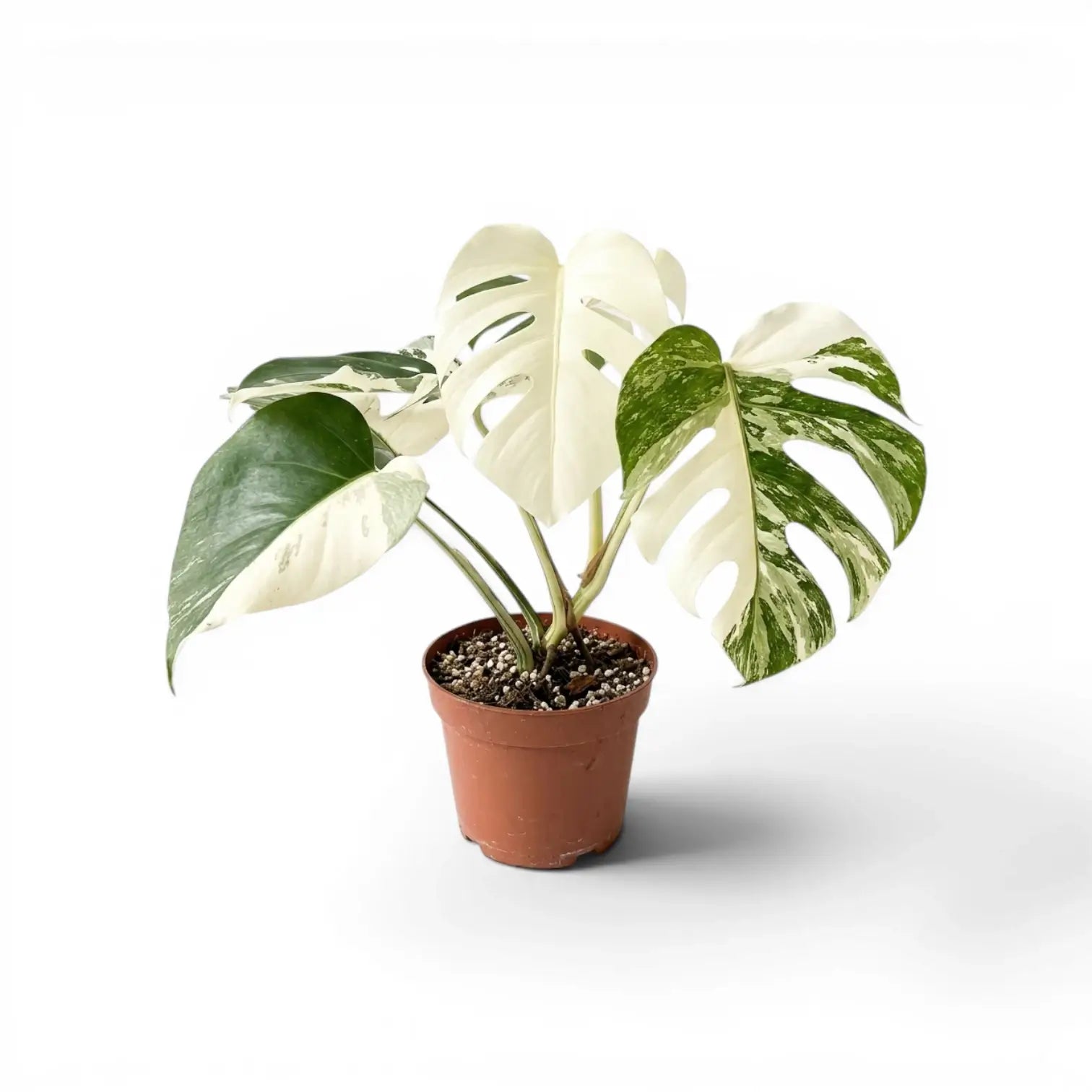
buy white monstera plant Monstera Super WhiteMonstera deliciosa variegata 'Super White' Monstera deliciosa variegata 'Super White' is a high white Monstera with broad pale sections set against green leaf tissue. The contrast is strongest when a leaf carries enough white to look almost block coloured, while the green parts contain the chlorophyll needed for future leaves. The plant grows as a climbing Monstera deliciosa with nodes, petioles and aerial roots along the stem. High white growth is
Monstera deliciosa variegata 'Super White'
Monstera deliciosa variegata 'Super White' is a high-white Monstera with broad pale sections set against green leaf tissue. The contrast is strongest when a leaf carries enough white to look almost block-coloured, while the green parts contain the chlorophyll needed for future leaves.
The plant grows as a climbing Monstera deliciosa with nodes, petioles and aerial roots along the stem. High-white growth is slower and more delicate than greener variegated growth; active nodes, firm roots and green leaf tissue are involved in new leaf production.
High-white leaves on Monstera deliciosa variegata 'Super White'
- Leaf contrast: Large white sections sit beside green tissue on broad Monstera leaves.
- Growth habit: The plant develops from a climbing stem with nodes and aerial roots.
- Green tissue: Green sections contain chlorophyll, while white tissue contains little to none.
- Mature foliage: Established supported growth can produce larger split and fenestrated leaves.
How high-white Monstera growth behaves
White leaf tissue naturally has less chlorophyll than green tissue. A plant with active roots, a viable growth point and some green tissue is more likely to keep producing new leaves than a cutting carrying mostly white tissue.
Older white areas may brown with age. Direct sun, dry roots, cold wet substrate, root disturbance and heavy fertiliser can speed that browning, especially on leaves that are still hardening. The healthiest plants usually keep a visible balance of green and white along the stem.
Super White Monstera care priorities
- Light: Give bright filtered light for a long photoperiod, with no direct midday sun on white sections.
- Watering: Let the upper mix dry before watering deeply, then allow the pot to drain completely.
- Root zone: Use an airy aroid mix so thick roots are not trapped in compacted wet soil.
- Humidity: Keep humidity steady during leaf expansion to reduce dry edges and tearing on new growth.
- Support: Install a sturdy pole or plank before the stem bends under heavier leaves.
- Pruning: Keep green tissue where possible because it contains chlorophyll for new leaf production.
- Fertilising: Feed sparingly after the plant is rooted and extending; high-white sections mark quickly when salts or root stress build up.
- Repotting: Repot only when the container is clearly root-filled, using a snug pot and a coarse mix that dries evenly.
Common Super White Monstera problems
- White parts turning brown: Some browning is normal on older white tissue; check sun intensity, watering gaps and root condition if it spreads quickly.
- Slow growth: High-white plants often grow slowly; review warmth, root space, support and the amount of green tissue available.
- Rot at a node: Improve drainage immediately and keep propagation material warm, airy and only lightly moist.
- Marked or distorted leaves: Inspect new growth and petiole bases for thrips, mites or scale.
Super White Monstera safety
Monstera deliciosa variegata 'Super White' is not safe for pets or children to chew because of calcium oxalate crystals. Wear gloves if your skin reacts to aroid sap, and clean tools after cutting.
Monstera deliciosa species background
Monstera deliciosa is an Araceae species native to wet tropical forest from parts of southern Mexico to Guatemala. Monstera refers to the unusual mature leaf form, while deliciosa points to the ripe fruit produced by mature plants in suitable tropical climates.
High-white leaves mark less easily with an aerated root zone, remaining green tissue and even moisture.
Shipping Notes
- Free Standard Shipping on $100+ Orders to the USA.
- Except Preorder products are shipped in 48 hours.
- Delivery to the USA:
- Standard Shipping : 3-10 business days
- If time is of the essence, please consider selecting expedited delivery for faster service.
Exchange/Return Notes
- We offer a 30-day return/exchange service after receiving.
- Final sale items are not eligible for returns or exchanges.
- To process your return/exchange, please contact us at [email protected]
- Please click here for more details>>> Return & Exchange Policy