SKU: 19021897951
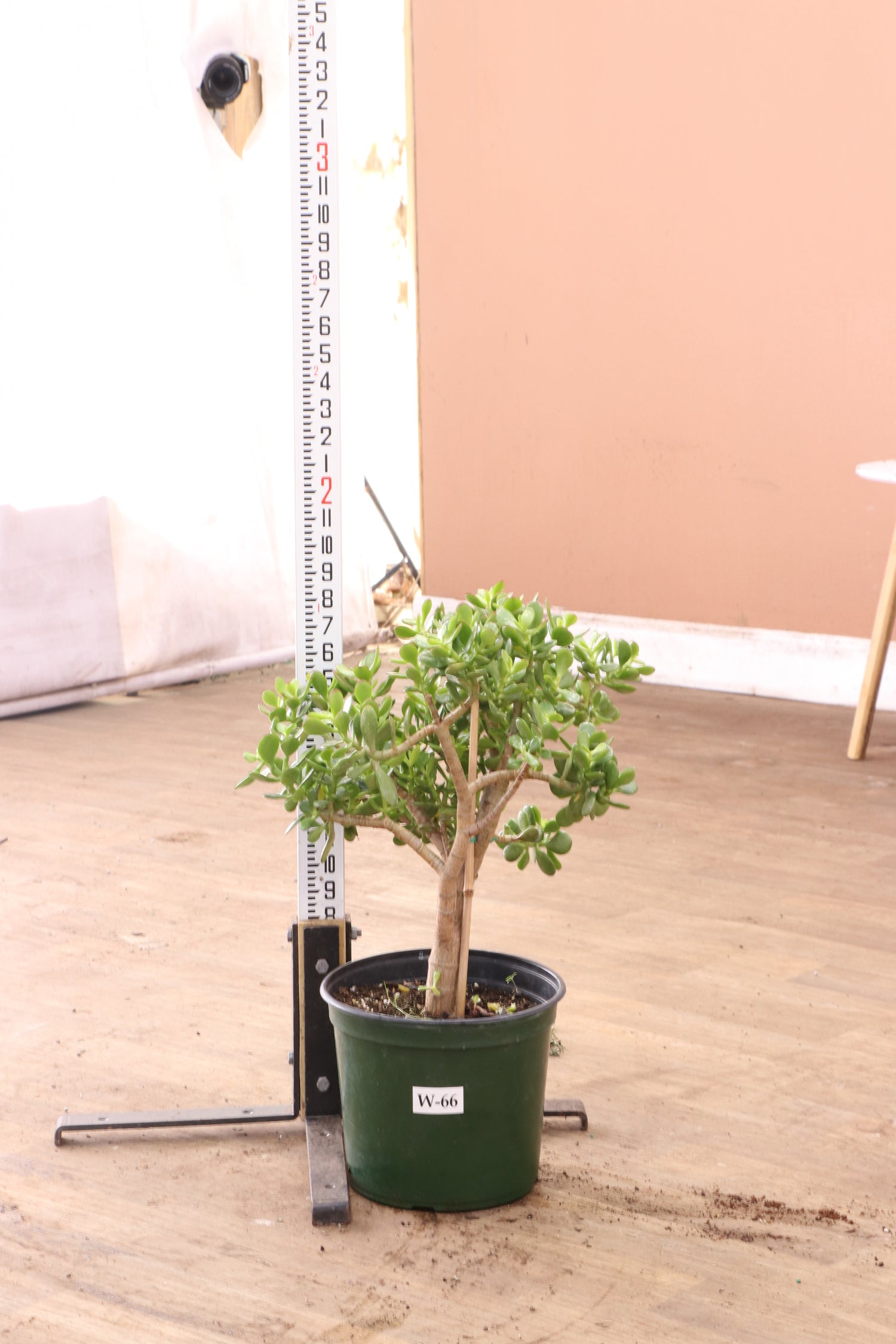
jade bonsai tree for sale

jade bonsai tree for sale Full Size Jade Succulent Bonsai (Crassula)

Sale price$25.92 Regular price$28.80
Save 10%

Pay in installments of $7.20 with ShopPay, AfterPay and Klarna

Shipping Estimate
USA
  • USA
  • CAN

Ships within 48 hours · Estimated delivery Oct 1 - Oct 6

Promo Codes Available:

For Your Every Summer RSVP, with Code: SUMMER15

Description

jade bonsai tree for sale Full Size Jade Succulent Bonsai (Crassula)Description The jade bonsai brings a peaceful presence to any home. Its glossy leaves and THICK woody trunk give the plant a bonsai look or a mini tree look. Having a mini tree that's also a succulent? Yes please! it creates the sense of calm we all need. The jade bonsai isn't your ordinary houseplant it's a miniature masterpiece, offering wonderful company without demanding constant attention. And it grows more beautiful with time, just like your

Description

The jade bonsai brings a peaceful presence to any home. Its glossy leaves and THICK woody trunk give the plant a bonsai look or a mini tree look. Having a mini tree that's also a succulent? Yes please! it creates the sense of calm we all need.

The jade bonsai isn't your ordinary houseplant – it's a miniature masterpiece, offering wonderful company without demanding constant attention. And it grows more beautiful with time, just like your friendship over the years. It’s a forgiving little tree, perfect for new plant parents and established green fingers.


Care 

Are bonsai trees hard to maintain?

We know many people worry about bonsai care, but your jade bonsai is wonderfully understanding! Unlike more demanding varieties, it’ll forgive occasional neglect and keeps thriving even when life gets hectic. Perfect for nurturing your confidence.

Jade bonsai care is refreshingly straightforward, making it ideal for both beginners and busy plant enthusiasts. You just need to focus on three simple things: proper light, infrequent watering, and occasional pruning. We're here to guide you through each step.


How much light does a jade bonsai need?

Your jade bonsai flourishes in bright, indirect sunlight – think of it as your plant's daily vitamin D! Give your little tree 4-6 hours of bright light each day, but protect those delicate leaves from harsh direct rays.

Learning how to care for a jade plant is wonderfully simple: provide good light, water thoughtfully, and give it space to grow at its own pace. 


How often do you water a jade plant? 

Your jade plant appreciates a thoughtful watering approach. Wait until the soil feels nearly completely dry before offering a drink – usually every 2-3 weeks. It's better to underwater than overwater, as these resilient plants store water in their leaves.


Is jade bonsai good for beginners?

If you've experienced heartbreak with other plants, let the jade bonsai tree help restore your confidence! This understanding little tree tolerates learning curves and forgetfulness, making it perfect for those just starting their plant journey or wanting a fresh start.

Our small jade bonsai offers gentle encouragement as you develop your plant care skills. Behind any successful "plant person,” there might be a patient jade bonsai quietly supporting their growth. It could be the companion you need to believe in your green thumb again.


Should I mist my jade bonsai?

Your jade bonsai tree is wonderfully low-maintenance and doesn't require regular misting. While an occasional gentle mist won't harm your plant, this resilient succulent naturally thrives in drier conditions. We love how adaptable these plants are to typical home environments!


Does jade bonsai need sunlight? 

Yes, your jade bonsai needs sunlight to stay healthy and happy! These lovely trees thrive in bright conditions but appreciate protection from intense, direct rays that stress their leaves. Think of it as needing gentle warmth rather than harsh heat.

Basic jade bonsai care means providing bright indirect light and waiting until the soil dries before watering. It's a simple routine that becomes second nature, and we're always here if you need guidance along the way.


Do jade plants like deep or shallow pots?

Jade bonsai plants feel most comfortable in shallow pots with good drainage. This keeps them compact and prevents root problems that could affect their health. We want your plant to have the perfect home where it can thrive for years.


Do jade plants like to hang?

While your jade plant can adapt to hanging arrangements, these steady companions typically prefer traditional upright displays. 


How big do jade bonsai get? 

Your jade bonsai will typically reach about 1-4 feet tall when lovingly maintained, creating the perfect tabletop companion. Unlike their larger relatives that can grow up to 15 feet, these miniature beauties are perfectly sized for indoor spaces and apartments.


How do I keep my jade plant small? 

Keeping your jade plant small involves gentle, regular pruning – think of it as giving your plant a caring trim. This encourages compact growth and helps maintain that adorable bonsai form we all cherish. Your plant actually benefits from this attention!


What is the best fertilizer for jade bonsai?

Your jade bonsai appreciates gentle nutrition without overwhelming its system. A balanced, water-soluble fertilizer once monthly during the growing season provides just what it needs. We believe in supporting your plant's natural growth rhythm.


Can jade bonsai trees survive outdoor conditions?

Your jade bonsai can enjoy outdoor time in warm weather! These adaptable trees thrive outside when temperatures stay consistently between 65-95°F. Just remember to bring your plant inside before temperatures drop below 40°F to keep it safe and comfortable.

Taking your jade outside is wonderful for both of you during suitable weather. In warm climates, it will soak up the sunshine and fresh air, but always be ready to welcome it back inside when temperatures change. We want your plant to feel secure wherever it grows.


What are the best conditions for growing a jade bonsai indoors?

Your jade bonsai will thrive with bright indirect light, temperatures between 65-95°F, and soil that's allowed to dry completely between waterings. Creating these comfortable conditions helps your plant feel secure and encourages healthy growth throughout the year.

Think of your jade bonsai tree as a steady companion who appreciates consistency. Give it a shallow pot with good drainage, monthly fertilizing during growing season, and regular pruning to keep it looking its best. 


Pet-friendly?

When it comes to pet safety, we need to share some important information about your jade bonsai. True jade plants from the Crassula genus are toxic to both cats and dogs, and we want to help you keep your furry family members safe and healthy.


Are jade bonsai toxic to cats? 

Unfortunately, jade bonsai trees made from Crassula species are toxic to our feline friends. If your kitty nibbles on any part of your jade bonsai, they may experience vomiting, lethargy, or loss of coordination. Call your vet straight away. 


Are jade bonsai trees safe for dogs? 

Jade bonsai trees are toxic to your canine companions. These Crassula species can cause vomiting, stomach pain, and lethargy if ingested. Small dogs are especially vulnerable, so extra caution is needed in homes with petite pups


Factoids

Is jade bonsai the same as dwarf jade? 

Dwarf jade and regular jade are actually different plant species, each with their own special qualities! Dwarf jade (Portulacaria afra) and the jade plant (Crassula ovata) may look similar, but they're actually distinct plants with unique characteristics.


What is the significance of jade bonsai?

Your jade bonsai carries beautiful meaning beyond its appearance! These charming trees are associated with prosperity, positive energy, and good fortune. Many people give them as thoughtful gifts to share blessings with loved ones – a tradition we're honored to continue.


Do jade bonsai trees lose their leaves?

Your jade bonsai tree keeps its leaves year-round. If you notice leaf drop, it's usually your plant's gentle way of telling you something needs adjusting – perhaps watering, light, or temperature. We're here to help you understand these signals.


Do jade plants flower? 

Your jade can surprise you with blooms! With proper care, jade plants produce lovely white or pink flowers in late spring to early summer. They often come after a brief dry period – nature's way of celebrating resilience together.


How long do jade bonsai live?

With loving care, your jade bonsai can be a lifelong companion! These remarkable plants can thrive for over a hundred years, potentially becoming heirlooms passed down through generations. We think that's pretty special – a living legacy of care and connection.


How big does a jade plant get? 

Jade plant relatives can reach an impressive 10-15 feet tall! But as a cherished bonsai, yours will stay beautifully compact at about 2-4 feet, depending on your pruning care. This size makes it an ideal companion for any space.


Buy a Jade Bonsai

Are you ready to start a rewarding journey with your very own jade bonsai? Our jade bonsai trees come with all the patience and charm you need for successful plant parenthood – there’s no experience required!

Each jade bonsai tree has been carefully nurtured to bring you years of peaceful companionship. Perfect for busy families, new plant parents, or anyone seeking a gentle introduction to the world of bonsai. Let us help you find the perfect green companion today!

Shipping Notes
  • Free Standard Shipping on $100+ Orders to the USA.
  • Except Preorder products are shipped in 48 hours.
  • Delivery to the USA:
  1. Standard Shipping : 3-10 business days
  • If time is of the essence, please consider selecting expedited delivery for faster service.
Exchange/Return Notes
  • We offer a 30-day return/exchange service after receiving.
  • Final sale items are not eligible for returns or exchanges.
  • To process your return/exchange, please contact us at [email protected]
  • Please click here for more details>>> Return & Exchange Policy
SKU: 19021897951

Discover Niche Categories That Outsell jade bonsai tree for sale

Top-Converting Item to Boost Your Average Order

4.2 ★★★★★
Based on 19 reviews
Sort
Highest Rating
Newest First
Oldest First
Product Reviews
L
Verified Purchase
L-1011
Birmingham, US
★★★★★ 5
Unmatched Quality for Images and Photos
This is an 'initial impressions' review after setup and a few weeks use. - Best Use Case: If, like us, your printing needs are 80% creative (artwork, photographs, etc.), 20% light document printing and occasional scanning, then this printer will meet your needs. Even though you won't be buying a new cartridge with a thimbleful of ink every 100 pages, I would not recommend this printer for high-volume workplace printing. It's not built for speed and you'll be filling the paper tray too often to be productive. Likewise, unlike a more office-oriented printer, the ET-8500 does not have a feeder for the scanner. - Unboxing / Setup: While it did take about an hour to set up, the process went much easier than I anticipated based on the reviews I read. We have it connected to our home network via Ethernet and I was able to do all necessary configuration via the printer's touch screen. Aligning the print heads is a rather lengthy process, so be prepared to spend some time on this. Our old printer would semi-self align by scanning the alignment samples once they were printed. With the ED-8500, I had to manually select which alignment settings looked best, which slowed the process considerably. - Hardware Quality: Overall, the printer feels well-built and worth the money. That being said, I do agree with other reviewers who state the paper trays feel a little chintzy and possibly easy to damage if you don't handle them with kid gloves. No problems thus far, however, so I'm simply crossing my fingers with the hoping for the best. On the flip side, I love that the output tray fully retracts into the printer when not in use. Touch screen operation is a veritable godsend compared to the wonky, practically useless LCD on our old printer. In fact, with a thumb drive or (full sized) SD card, you can perform many operations straight from the touchscreen. - Software: While it did install applications I'm not likely to use, Epson's software is much less intrusive, in my opinion, than you-know-who's naggy, resource consuming bloatware. I can't speak to the smartphone application as I have no need for it thus far. I'm also pleased to report that the printer will work without Alexia, which I will never have a need for. No problems with the software and we're able to print from any computer on the network without issue. - Scanning: As I stated above, there's no feed for the scanner, so you'll have to manually change pages if you have a multi-page document to scan. Not a problem for us, though, and my wife loves that she can scan a document straight to her thumb drive without having to bother me while I'm working. Overall quality is more than adequate for all but the most demanding scanning jobs. - Ink: With its foolproof design, filling the six ink tanks couldn't be easier, and after six weeks of use, including approximately 200 pages of image laden documents using the highest quality print level (which would have eaten up two 'XL' cartridges in my old printer), the ink levels in the ET-8500 have barely moved. Furthermore, refilling all six tanks cost only a little more than those two 'XL' cartridges would have. Very happy in this regard. - Print Quality: Even on regular paper at regular print quality, the ET-8500 hands-down smokes anything in its price range. Amp up the print quality and print to photographic paper and the results are absolutely jaw-dropping. Seriously, my brother is a professional large-format printer / sign maker, and the print quality from the ET-8500 rivals his $75,000 4' x 8' flatbed. Rich, vibrant colors pop from the page and are sure to impress even the toughest critic. This, in my opinion, more than makes up for the ET-8500 not being the fastest horse in the race. I will update my review should anything go south, but for now I give the ET-8500 a big thumbs up. For the quality you get, it is well worth the price in my opinion.
WAS THIS REVIEW HELPFUL?YesReportShare
Reviewed in the United States on May 12, 2025
M
Verified Purchase
MandieSue76
Draper, US
★★★★★ 1
Overpriced Garbage
Bought March 2024. Paper jam June 2025, after not even hitting 600 pages printed (we never even refilled the ink tanks!). Since it's out of warranty, Epson wanted us to pay to send it back for service. I thought maybe Best Buy Geek Squad would be cheaper, since they'll service items that weren't purchased through them. I have Best Buy Geek Squad here right now and he found "the worst paper jam he's ever seen" and the paper still won't feed, not from the rear, not from the top, not from the tray, even through he found the jam and cleared it. The jammed paper DID come out with rubber crumbs from the feed wheel. He suspects that the wheel is so worn from us trying to fix it with printing cycles, that the wheel needs to be replaced. The part is $110. Getting Geek Squad out here was $125. For a $700 printer that lasted a year. After working for about an hour, the service guy said it sounded like there was a motor wheel not turning properly on one side as well, which was causing grinding gears, and would be a separate replacement part. He said he hates Epson, that most printers are made to be throw away now (our last Canon photo printer lasted 15 years), and to not spend more than $200-$300 on a Brother printer to replace it, so that's what I'm doing. This was my first experience with Epson and it will definitely be my last.
WAS THIS REVIEW HELPFUL?YesReportShare
Reviewed in the United States on July 19, 2025
A
Verified Purchase
Abraham
Massapequa, US
★★★★★ 5
Excellent print quality, easy-to-use software, very long lasting ink
This review is for an Epson ET-8500 printer/scanner/copier. ET stands for Eco Tank as the printer uses tanks of ink filled by the user from bottles. The tanks last far longer than the ink cartridges we've all been using and the price per page is far less. The 8500 prints 8.5x11 and 8.5x14 as well as smaller sizes like 8x10, 5x7, 4x6 and printable CDs, DVDs and BDs. The scanner has a maximum resolution of 4800 x 1200 dpi. I bought this printer to replace an Epson RX 580 we bought in late 2006 and for which we must have spent several printer's worth of money on ink. Our primary use has been and remains printing photographs. We feel we require a six-ink printer for this task which limited our printer choices. We have never had any brand other than Epson dating back to the dot matrix printers we used with our homemade PC XT so I will be unable to compare the performance of this printer to other brands. We were sorely tempted to buy the ET-8550 vice the 8500 for the occasional need to print 11x14s and larger as it was only an additional $50 but we simply didn't have the table space for it. The price of this printer has come down significantly from when it was first introduced, so if you're thinking you can't afford it, look again. The unpacking and setup on the 8500 were simpler and more trouble-free than other printers I've used in the recent past. The printer can be connected to your computer via a shared wireless or wired network or a primary tier USB link. You can also print from a thumb drive (USB memory stick), your camera's SD chip, wirelessly from a smart phone or tablet. Epson provides the printer with a unique email address and any images sent to that address (from anywhere on the planet) will automatically be printed by your printer. If you have a voice assistant on your home network, you can control your printer with voice commands. All in all, a very capable and well thought out device. We were nervous about filling our ink tanks the first time. The thought of a bottle of printer ink spilling seemed an absolute nightmare. But, as might have been expected, the process was utterly fool-proof (and you're reading a top notch fool here). The tops of the ink bottles and ink tanks are keyed so you cannot put ink in the wrong tank. Ink does not come out of the bottle till it is inverted on the proper tank and flow stops when the tank becomes full. The first filling will also have to fill all the tubing and what not between the tanks and the print nozzles and so will fill the tanks slightly less full than all further bottles. Loading paper is also painless. The printer has two cassettes: one for 8.5 x 11 and one for 5x7 or smaller. The printer can take thicker paper by two routes in the back: the rear paper feeder at the back on top, and the rear paper feed slot, in the rear. Here is my one unpleasantness concerning this printer but fortunately for you and Epson, the unpleasantness was almost entirely my fault. Either route may be used for thicker paper, such a heavyweight photo paper or thick cardstock. The Rear Paper Feeder at the top rear will still take your paper through almost 90 degrees of bend but not the hard 180 that it experiences coming from the cassettes. Paper loaded into the Rear Paper Feed Slot at the printer's rear, will traverse a completely flat path. Theoretically, you could put a sheet of thin glass through there... but please don't. I have used both with 80 lb (thick) photo paper with no problem whatsoever. The unpleasantness I mentioned was caused when I became confused as to which route was which, deciding that the feeder was the slot and the slot was the feeder. This led me to two lengthy calls to Epson tech support where two different techs spent an inordinate amount of time and effort trying to convince me I had made a mistake without insulting a sacred Epson customer by telling me I had made a mistake. When I finally came to my senses, I wrote a long and heartfelt apology to Epson Tech Support for what I had put them through. Very embarrassing. The printers output on plain paper, card stock and three different grades of photo paper has been absolutely perfect. There will always be some difference between your screen and your printer, particularly with the printer straight out of the box and no attempt having been made to match up the two, but the prints have been more than satisfactory to this point. And I have yet to see any of my ink levels - now visible directly through graduated translucent windows on the printer's front - so much as budge. A good portent. I have looked at refill ink bottles and the cost for a full set is slightly more than a set of cartridges for my RX 580 cost but provides several times the quantity of ink. Interestingly, the colors of inks used has changed. My RX 580 used to use Cyan, Light Cyan, Magenta, Light Magenta, Yellow and Black. The ET 8500 uses Cyan, Magenta, Yellow, Photo Grey, Photo Black and Black. That last one is used for text and is not used for photographs. The Photo Grey and Photo Black are not used on text. I only have my eyes, but in my judgement, the prints from the ET 8500 are superior to those from the old RX 580 in accuracy, detail and color. Text documents are crisp and clear. Image quality on plain paper is more than acceptable though I understand there are other brands that do it slightly better. If I had to do it all over, I would again buy the ET 8500. Ease-of-use, economy and beautiful output make it the ideal choice. And I will never again buy a printer that uses cartridges. Never.
WAS THIS REVIEW HELPFUL?YesReportShare
Reviewed in the United States on March 14, 2024
A
Verified Purchase
Ashley
Lowell, US
★★★★★ 5
Original ink lasted me 3 years!
*Update in Dec 2024* Still going strong! Today for the first time in 3 years it finally forced me to refill the ink tanks. 3 YEARS! Still prints beautifully. So grateful for my Epson printer. *Original Review* I bought a Cricut for Christmas and needed a great 3 in 1 printer to print stickers, print docs front and back, print 4x6, 5x7, and 8x10 photos, as well as scan my ultrasound photos. (I did not use this for sublimation, but hear that it can be great for that too.) This thing exceeded my expectations. I’ve been using it almost every day for 5 months and it still is almost filled completely full with ink, which I can see on the front of the machine. Setup instructions were super easy and was a pleasure to get through. Before this printer I had returned 2 other printers that disappointed me. (I ended up tossing my old one years ago because the HP printer dried up so quickly.) This printer feels like it was built to last. The doors and cassettes click into place, feeling very satisfying and never leaving me wonder if I pushed it in all the way. I’ll probably never use ink cartridges again. Eco tank is the way to go. First of all, I had no idea when I bought it that you can scan and print photos using the app on your phone. It’s made things so much simpler to manage and edit. One thing I wish it had was color sliders to tweak the images a bit before printing. The scan bed is AWESOME. It’s very basic with a thin plastic lid, but I’m comparing it to the scan job the scanners at Office Max did. Those were terrible, costly if you have multiple images needing scanned, and always came out blurry with noticeable glares. (The employees also wanted to argue about HIPPA with me with my own ultrasounds…) This printer’s scan does a phenomenal job. With 300 dpi it is crystal clear with no glare! And I love that it saves directly onto your phone. A USB or SD card is only optional. You can choose to scan in color, grayscale, or black and white. For ultrasounds, definitely use the grayscale. The photo print quality is very good as well. Not sure if it’s as good as WalMart prints when it comes to color, but the quality is pretty similar. Sometimes the photos appear slightly blue, but I think it’s the photo paper I’m using. The white paper may have a slight blue hue to it. As a photographer, I’m content with saving me the trip by using this printer instead for my own personal needs. The main con I can think of is that it does print slow if you choose higher quality prints. (May take 3 minutes to print a photo.) If you need speed, this may not be your guy. If you choose Normal quality prints it goes a lot faster, but documents appear very pixely. I had a paper jam once, but it was very quick and easy to open up the printer and pull it out. I have yet to try printing with the cardstock paper feed in the back. I’ve been printing thin cardstock from the top feed and that seems to work out just fine. Another con is sometimes when I’m printing from the computer I have to turn the printer off and on again because for some reason it doesn’t always get the signal to print. Not sure what is going on there, but it doesn’t happen too often. Overall, I am still elated with my purchase 5 months later. Never had a printer that made me smile weekly before. This was worth every penny.
WAS THIS REVIEW HELPFUL?YesReportShare
Reviewed in the United States on July 5, 2022
G
Verified Purchase
Guy in a chair
Phoenix, US
★★★★★ 4
Great quality prints and ink longevity/savings over a cartridge printer but at times a bit finicky.
First, the print quality is outstanding and the money I saved on ink vs what I spent on ink cartridges from my old inkjet printer has been substantial. I printed over 8500 photos on my ET 8500 until it died…unfortunately right after I filled all the tanks with ink. I did go through the gray (GY) ink faster than the others but not sure why. After approximately 5000 prints i began to get frequent paper jamb error messages when there wasn’t any paper jamb. I eventually found a clumsy time-consuming work-around but not ideal. On the plus side, I give Epson customer phone support a decent grade, but it depends on who in India you get for help. The other nice thing is that it has a two year warranty, so something to consider if you’re thinking about buying Amazon’s 3-year warranty because you’d basically be buying a one-year warranty. Still if you print as many pics as I do, it might be worth it. So, would I buy it again? Yes, and in fact I plan to do just that.
WAS THIS REVIEW HELPFUL?YesReportShare
Reviewed in the United States on September 14, 2024

recommand products