Pay in installments of $5.81 with
 ,
,
 and
and

Shipping Estimate
USA
- USA
- CAN
- USA
- CAN
Ships within 48 hours · Estimated delivery Sep 28 - Oct 3
 Promo Codes Available:
For Your Every Summer RSVP, with Code: SUMMER15
Description
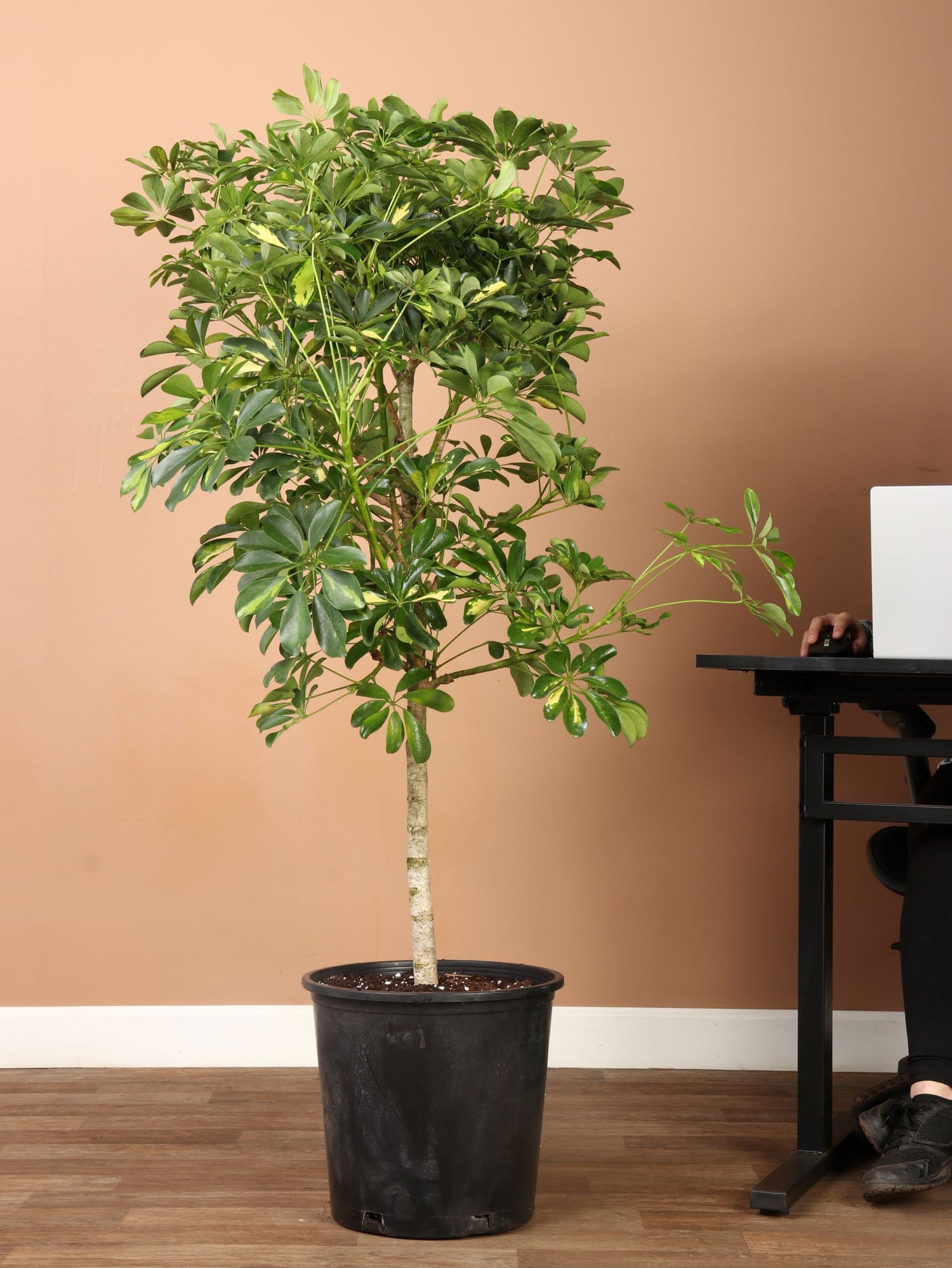
schefflera arboricola white 6-8ft Schefflera Arboricola Variegated – Dahing PlantsDescription Oh, you'll love how the Arboricola makes everything feel right in your home! Those perfectly arranged umbrella shaped leaves create such a welcoming presence, and this Umbrella Plant brings that ideal balance of structure and softness to any space. This Schefflera Arboricola has been winning hearts for decades with its forgiving nature and those lovely umbrella leaves. Growing 3 7 feet tall (0. 9 2. 1 meters), your Arboricola will become a
Description
Oh, you'll love how the Arboricola makes everything feel right in your home! Those perfectly arranged umbrella-shaped leaves create such a welcoming presence, and this Umbrella Plant brings that ideal balance of structure and softness to any space.
This Schefflera Arboricola has been winning hearts for decades with its forgiving nature and those lovely umbrella leaves. Growing 3-7 feet tall (0.9-2.1 meters), your Arboricola will become a cherished companion that quietly purifies your air while adding that special touch of green life. Our customers adore how reliable these plants are - they're truly built for those long-term plant relationships we all treasure!
Care
How do I care for an Arboricola?
You'll love how easy Arboricola care is! Give your plant bright indirect light and water when the soil feels dry. It handles normal room temperatures like a champ and forgives you completely if you're still learning plant care routines.
Is Arboricola a good indoor plant?
Your Arboricola is absolutely wonderful indoors, adapting easily to different home conditions while quietly cleaning your air all day. It’s forgiving with watering schedules and doesn't stress when life gets busy, giving you one less thing to worry about.
Does Arboricola like sun or shade?
The Arboricola loves bright indirect light best, though it'll handle some shade without any complaints whatsoever. Direct harsh sunlight can scorch those umbrella leaves, so we always recommend that perfect filtered light for its happiest growth and health.
How often should I water an Arboricola?
Water your Arboricola when the top few inches of soil feel dry, usually every week or two depending on your home's conditions. It's not fussy about exact timing - just check the soil and you'll know when it's ready!
Can I put my Umbrella Plant outside in the summer?
Your Umbrella Plant loves summer outdoor time with fresh air and natural humidity to perk it right up. Just protect it from harsh afternoon sun and bring it inside before temperatures drop below 54°F (12°C) in the fall.
Where is the best place to put an Umbrella Plant in the house?
We always tell our customers to place Umbrella Plants near east or north-facing windows for that perfect bright, indirect light. Keep it away from cold drafts and heating vents where temperature swings might stress it out unnecessarily.
Do Umbrella Plants like to be misted?
Light misting is lovely for your Umbrella Plant - like giving it a gentle spa day that brightens its week! Heavy daily misting isn't necessary, though. Instead, think about using a humidity tray to create the best conditions.
How much light does an Arboricola need?
Your Arboricola needs about 4-5 hours of bright indirect light daily to maintain those lovely colors and healthy growth patterns. Less light means it might get a bit leggy and lose that full, lush look we all love so much.
What fertilizer is best for Arboricola?
Feed your Arboricola with a balanced liquid fertilizer at half strength monthly during spring and summer growing seasons when it's actively growing. Think gentle nourishment rather than big meals, and skip winter feeding when it's naturally resting.
Pet-friendly?
Caution - your Arboricola isn't safe for curious pets. They contain compounds that can make pets sick, so it's important to keep them somewhere your furry family members can't reach.
Are Arboricola toxic to dogs?
Arboricolas are toxic to dogs and can cause drooling, vomiting, and mouth irritation if nibbled on by curious pups. If your dog gets a taste, contact your vet right away - we always recommend being cautious with plant safety around pets.
Are Arboricola toxic to cats?
Arboricolas are toxic to cats, causing drooling and stomach upset that can make them quite uncomfortable and miserable. Keep it away from curious kitties who might think those umbrella leaves look tempting to explore with their mouths and paws.
Factoids
How tall do Schefflera Arboricolas get?
Indoor Schefflera Arboricolas typically reach 3-8 feet tall (0.9-2.1 meters), perfect for making a statement without overwhelming your living space completely. Outdoors in their natural habitat they can hit 25 feet - but don't worry about that happening indoors, even with proper care!
Is an Arboricola air-purifying?
Your Arboricola works quietly to remove toxins like benzene and formaldehyde from your air while looking lovely doing it. It’s a living air filter that just needs occasional watering and appreciation for all that hard work around your home.
Why is Schefflera Arboricola called an Umbrella Plant?
Those lovely leaves feature 7-9 leaflets radiating from each stem like perfect umbrella spokes in such a distinctive pattern! Once you see that arrangement, you'll understand exactly why this Umbrella Plant earned such a fitting and descriptive name.
Buy a Schefflera Arboricola
Looking for a plant that brings reliable beauty and forgiving care to your home? This Arboricola offers the perfect blend of striking presence and easygoing nature that makes plant parenthood truly enjoyable.
Our video shopping calls let you meet your future green companion before it comes home, so you can choose the perfect specimen that speaks to your heart.
Shipping Notes
- Free Standard Shipping on $100+ Orders to the USA.
- Except Preorder products are shipped in 48 hours.
- Delivery to the USA:
- Standard Shipping : 3-10 business days
- If time is of the essence, please consider selecting expedited delivery for faster service.
Exchange/Return Notes
- We offer a 30-day return/exchange service after receiving.
- Final sale items are not eligible for returns or exchanges.
- To process your return/exchange, please contact us at [email protected]
- Please click here for more details>>> Return & Exchange Policy