Pay in installments of $5.82 with
 ,
,
 and
and

Shipping Estimate
USA
- USA
- CAN
- USA
- CAN
Ships within 48 hours · Estimated delivery Sep 26 - Oct 1
 Promo Codes Available:
For Your Every Summer RSVP, with Code: SUMMER15
Description
tall stem succulent Buy Tall Slipper Plant Phoenix, AZ | PedilanthusPhoenix's Most Striking Drought Tolerant Succulent Shrub Tall Slipper Plant (Pedilanthus bracteatus) is one of the most architecturally dramatic succulents you can grow in the Phoenix Valley. Rising 46 feet tall with thick, fleshy green stems and vivid red orange slipper shaped flowers, this Mexican native thrives in extreme heat with almost no water once established. Whether youre designing a modern xeriscape in Scottsdale, adding sculptural interest
Phoenix's Most Striking Drought-Tolerant Succulent Shrub
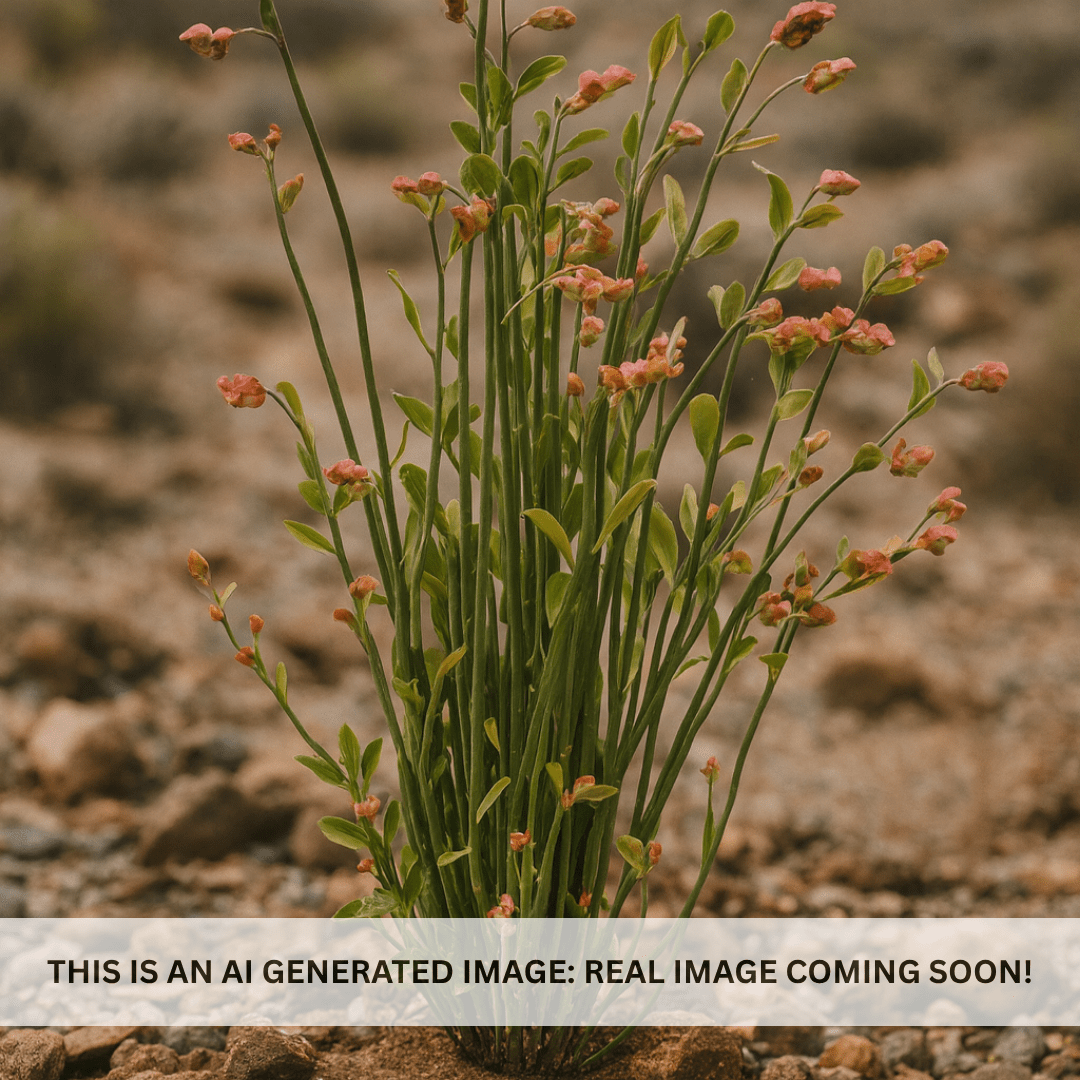
Tall Slipper Plant (Pedilanthus bracteatus) is one of the most architecturally dramatic succulents you can grow in the Phoenix Valley. Rising 4–6 feet tall with thick, fleshy green stems and vivid red-orange slipper-shaped flowers, this Mexican native thrives in extreme heat with almost no water once established. Whether you’re designing a modern xeriscape in Scottsdale, adding sculptural interest to a Chandler courtyard, or building a low-water border in Mesa — Tall Slipper Plant delivers bold impact with minimal effort.
Tall Slipper Plant Details
| Attribute | Detail |
|---|---|
| Scientific Name | Pedilanthus bracteatus |
| Common Names | Tall Slipper Plant, Slipper Flower, Lady’s Slipper |
| Mature Height | 4–6 feet |
| Mature Width | 2–3 feet |
| Growth Rate | Moderate — 1–2 feet per year in Phoenix |
| Sun | Full sun to partial shade. Handles reflected heat from walls. |
| Water | Very low once established. Extremely drought-tolerant. |
| USDA Zones | 9–11 (Phoenix is Zone 9b–10a) |
| Soil | Well-draining. Thrives in rocky, sandy, or Arizona caliche soils. |
| Foliage | Semi-evergreen — thick fleshy stems stay green year-round |
| Bloom Color | Red, orange, or yellow slipper-shaped flowers |
Tall Slipper Plant Uses in Phoenix Landscapes
Modern Desert Xeriscape
The upright, architectural form of Tall Slipper Plant makes it a perfect centerpiece for contemporary desert gardens. Its sculptural stems pair beautifully with boulders, decomposed granite, and clean gravel beds. Plant alongside Desert Spoon or Agave americana for a bold, low-water design statement.
Drought-Tolerant Borders & Accents
Use Tall Slipper Plant as a mid-height border along walkways, driveways, or property lines. Its dense, upright growth creates natural definition without heavy pruning. Space plants 2–3 feet apart for a continuous border effect.
Pool-Friendly Landscaping
With no leaves to shed and minimal litter, Tall Slipper Plant is ideal near pools and patios. The fleshy stems add tropical texture without the mess, and its low water needs keep irrigation simple in hardscape-heavy areas.
Best Time to Plant Tall Slipper Plant in Phoenix
Fall (October–November) is the ideal planting window. Warm soil encourages quick root establishment while cooler air reduces transplant stress. Your plant gets 6–8 months to settle in before facing its first Phoenix summer. Spring (February–April) is a solid second choice. Avoid summer planting when possible.
How to Plant Tall Slipper Plant
- Dig wide, not deep — 2–3x the root ball width, same depth
- Check for caliche — break through any hardpan layer for drainage
- Backfill with native soil — a light 20% pumice or perlite blend improves drainage
- Spacing — 2–3 ft apart for borders; 4–5 ft for standalone specimens
- Water basin — build a 3–4 inch ring to direct water to roots
- Mulch — 2–3 inches of gravel mulch to retain moisture and suppress weeds
Watering Tall Slipper Plant in Phoenix
First Year Watering Schedule
- Weeks 1–2: Every 2–3 days, deep and slow
- Month 1–2: Every 5–7 days
- Month 3–6: Every 10–14 days (weekly in peak summer)
- After Year 1: Every 2–3 weeks summer; monthly or less in winter
Drip Irrigation
Place one 1–2 GPH emitter 12–18 inches from the base. Established Tall Slipper Plants are extremely drought-tolerant and may need only occasional deep soaking during the hottest months.
How fast does Tall Slipper Plant grow in Phoenix?
Tall Slipper Plant grows at a moderate pace — expect 1–2 feet of new growth per year in Phoenix conditions. Most plants reach their full 4–6 foot height within 3–4 years.
Is Tall Slipper Plant drought tolerant?
Extremely. Once established, Tall Slipper Plant stores water in its thick stems and can survive on rainfall alone in most Phoenix-area landscapes. It’s one of the toughest succulents available.
Can Tall Slipper Plant handle full Phoenix summer sun?
Yes. It thrives in full sun including reflected heat from walls and pavement. It also tolerates partial shade, making it versatile for east- or west-facing exposures.
Is Tall Slipper Plant toxic?
The milky sap can cause skin irritation in sensitive individuals. Wear gloves when pruning and keep away from pets that tend to chew on plants.
You May Also Like
- Desert Spoon — Fan-shaped rosettes add dramatic desert texture alongside Tall Slipper Plant
- Red Bird of Paradise — Fiery blooms complement the slipper-shaped flowers perfectly
- Whale’s Tongue Agave — A bold, sculptural partner for modern xeriscape designs
- Baja Fairy Duster — Delicate red puffball flowers contrast beautifully with thick succulent stems
How Many Tall Slipper Plants Do I Need?
Each plant fills a 2 to 3 ft footprint, so space them about 2.5 ft apart for a continuous upright border and 4 to 5 ft apart as standalone specimens. Use this run-length guide for borders and screens:
| Border / Run Length | Plants Needed (2.5 ft spacing) |
|---|---|
| 10 ft | 4 plants |
| 20 ft | 8 plants |
| 30 ft | 12 plants |
| 40 ft | 16 plants |
As a sculptural focal point, plant single against a wall or in odd-numbered groups of 3 spaced about 3 ft apart so the candelabra stems read cleanly.
Tall Slipper Plant Season-by-Season in Phoenix
- Spring (Feb to Apr): New stem growth flushes and the first red-orange slipper flowers appear at the stem tips. A good second window for planting.
- Summer (May to Sep): Peak performance. The fleshy stems thrive in full sun and reflected heat, and bloom continues through the monsoon with almost no supplemental water.
- Fall (Oct to Nov): Prime planting season and continued color while temperatures ease.
- Winter (Dec to Jan): Growth slows and stems hold their green. This is a frost-tender species: protect or cover on nights below about 30°F, since hard frost can blacken the stem tips.
At a Glance
✔ Heat-Loving (Reflected-Heat Tolerant) ✔ Drought-Tolerant ✔ Pool-Friendly (Low-Litter) ✔ Low-Maintenance ✔ Hummingbird-Friendly ✔ Deer & Rabbit-Resistant ✔ Spineless
Plant It With
- Desert Spoon: fan-shaped rosette that grounds the upright stems with texture.
- Whale's Tongue Agave: a bold blue-gray rosette for sculptural contrast.
- Red Bird of Paradise: fiery summer blooms that echo the slipper flowers.
- Foxtail Agave: another spineless, pool-safe form for the same low-litter bed.
Is Tall Slipper Plant Right for Your Yard?
Tall Slipper Plant thrives in full sun to light shade, in rocky or caliche soil that drains fast, and needs very little water once established. Its spineless, low-litter habit makes it well suited to pool decks, patios, and modern xeriscapes. It is not a fit if your area sees hard winter frost without protection or if you want a plant that is fully safe to handle, since the milky sap can irritate skin and is toxic if chewed.
Shipping Notes
- Free Standard Shipping on $100+ Orders to the USA.
- Except Preorder products are shipped in 48 hours.
- Delivery to the USA:
- Standard Shipping : 3-10 business days
- If time is of the essence, please consider selecting expedited delivery for faster service.
Exchange/Return Notes
- We offer a 30-day return/exchange service after receiving.
- Final sale items are not eligible for returns or exchanges.
- To process your return/exchange, please contact us at [email protected]
- Please click here for more details>>> Return & Exchange Policy