Pay in installments of $5.95 with
 ,
,
 and
and

Shipping Estimate
USA
- USA
- CAN
- USA
- CAN
Ships within 48 hours · Estimated delivery Sep 25 - Sep 30
 Promo Codes Available:
For Your Every Summer RSVP, with Code: SUMMER15
Description
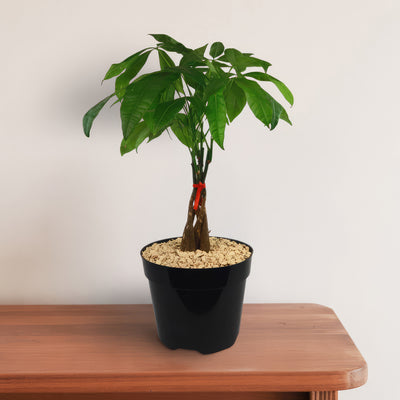
money tree plant pot Money Tree Plants ‘Pachira aquatica’ 8" Pot / Self Watering / With PotThe Money Tree Plant, known as Pachira aquatica, is one of the best low maintenance houseplants prized for its braided trunk, lush green leaves, and association with prosperity and good fortune. In short, it's called the Money Tree because of its symbolic ties to luck, wealth, and good fortune, not because it actually grows money, though some people do jokingly wish it did! Originating from tropical wetlands, this plant has gained immense popularity
The Money Tree Plant, known as Pachira aquatica, is one of the best low-maintenance houseplants prized for its braided trunk, lush green leaves, and association with prosperity and good fortune. In short, it's called the Money Tree because of its symbolic ties to luck, wealth, and good fortune, not because it actually grows money, though some people do jokingly wish it did!
Originating from tropical wetlands, this plant has gained immense popularity in modern homes, offices, and even business spaces across the world. The Money tree bonsai is a compact, artistic version of the traditional plant, often used to symbolize wealth and harmony in feng shui practices.
According to the principles of Feng Shui, the Money Tree is believed to bring luck, financial prosperity, and positive energy when placed in specific areas of a home or office. It is commonly placed in the southeast corner—known as the "wealth corner"—to invite abundance and growth. The braided trunk is said to trap fortune within its folds, while the five-lobed leaves represent the five fundamental elements: earth, water, fire, wind, and metal, creating a balanced flow of chi (energy).
The Pachira aquatica extremely fast growing up to 24 inches per year.
In its natural habitat, the Money Tree can grow up to 60 feet tall, but as a houseplant it can grow up to 6 feet tall indoors, and up to 12 feet tall outdoors in ideal your garden.
Native to Central and South America, the money tree plant has several other common names such as Malabar Chestnut, Guiana Chestnut, Chinese money tree, and Provision Tree.
The Money tree is admired for its glossy, hand-shaped palmate leaves that radiate from a central point, often with five to seven leaflets per stem, resembling an open hand.
The most iconic form features a braided trunk, achieved when several young stems are woven together while pliable and then grow as one. This braided appearance adds a sculptural quality and is often viewed as a symbolic protection of wealth.
The Money tree blooms during spring with large, showy white or cream-colored flowers with long stamens and a pleasant fragrance. These flowers later develop into large, woody seed pods containing edible chestnut-like nuts.
One of the plant’s most unique qualities is its adaptability to various environments—it can thrive indoors with minimal care, tolerate low humidity if acclimated properly, and purify indoor air. Its symbolic significance, combined with its ornamental structure, makes it a favorite for gifting during housewarmings, business openings, and holidays.
When and How to Water Your Monet Tree Plant
The Money Tree is moderately drought-tolerant due to its thick, water-storing trunk, but it thrives with a consistent watering schedule that avoids soggy roots. Always check the top 2 inches of soil for dryness before watering to prevent overwatering. Water your Money Tree every 7–10 days during the growing season with deep watering and reduce to once every 3–4 weeks in the dormant season.
From March to August, during the growing season, water thoroughly once every 7–10 days, ensuring excess water drains out of the pot. This is the Money tree plant’s active period, when it needs more hydration to support new foliage growth. Make sure the soil remains moist but never soggy, and consider misting the leaves lightly to increase humidity.
From September to February, in the dormant season, reduce watering to once every 3–4 weeks, providing just enough to prevent the roots from drying out. Overwatering in winter is a common mistake that can lead to root rot. Keep it in a warm spot and ensure proper drainage during these cooler months.
Light Requirements – Where to Place Your Money Tree
When growing indoors, the Money tree plant thrives in bright, indirect light for 6–8 hours a day.
Place them near east- or south-facing windows, but avoid direct sunlight, which can scorch the leaves.
They also adapt well to fluorescent lighting, making them ideal for offices and low-light homes.
When grown outdoors, place your Pachira Money Tree in a location that receives partial shade or filtered sunlight for 4–6 hours daily.
Direct outdoor sun, especially in hot climates, can burn the leaves. A shaded patio, balcony, or under taller plants works well, as long as there's good airflow.
Avoid low-light environments indoors or full sun outdoors, as both can cause stress. While adaptable, poor lighting leads to slow growth, leaf drop, or legginess. Rotate the plant occasionally for even light exposure and symmetrical growth.
Optimal Soil & Fertilizer Needs
Use a well-draining peat-based soil mixed with perlite or sand and fertilize once a year in the spring. The goal is to prevent waterlogging while retaining enough moisture for root absorption. Avoid heavy or clay-based soil. Planet Desert has specialized potting soil, opens in a new tabGo to Soil cactus mix blend 1 gal 4 qt cacti succulent dirt compost growing media that includes an organic substrate with mycorrhizae to help with the growth of a healthy root system, to help your money plant thrive.
Fertilize once a year in the spring with a balanced, water-soluble NPK fertilizer of about 5-10-5. Do not fertilize in the dormant months, as the plant's growth slows and excess nutrients can harm it. Adding organic matter such as worm castings or compost can enhance soil fertility, especially in pots. Make sure the container has drainage holes and never let the plant sit in standing water.
Indoor Money Tree Growing Requirements
When growing indoors, the Money Tree prefers temperatures between 65°F and 80°F, moderate humidity, and bright indirect light. To keep it healthy, place it near a bright window where it can receive 6–8 hours of filtered sunlight daily—east, south, or west-facing windows are ideal. Avoid direct sun, which can scorch the leaves, and supplement with a grow light if natural light is limited. The plant thrives in humidity levels of around 50–60%, which you can maintain with a humidifier, pebble tray, or regular misting, especially during dry winter months. Consistent temperatures are important; keep the plant away from drafts, heaters, or AC vents, as sudden changes can lead to leaf drop or stress. With stable conditions and good light, the Money Tree makes a striking and low-maintenance indoor companion.
Hardiness Zones & More
In the United States, this is mostly grown as an indoor plant, but if you live in warmer climates like southern Florida or Hawaii, specifically in USDA Zones 10-12, you may be able to cultivate it outdoors year-round with care.
In these zones, choose a location that receives bright morning sunlight with partial shade in the afternoon to avoid scorching the leaves.
Humidity should be maintained at moderate to high levels, ideally above 50%, to support healthy growth and prevent leaf drop. Use a humidity tray or humidifier to maintain 40–60% humidity indoors during winter.
Wildlife – Money Tree Flower Attracts the Following Friendly Pollinators
The Money Tree Flower is known to attract a variety of friendly pollinators, including butterflies, bees, bats, and hummingbirds. These creatures play a crucial role in the ecosystem by helping to pollinate plants and ensure their reproduction.
According to the ASPCA, the Pachira aquatica is non-toxic to humans, cats, dogs, and horses. This makes it a great option for pet-friendly households. However, ingestion of large amounts may still cause mild stomach upset.
How to propagate a Money Tree
The Chinese money tree can be propagated easily through stem cuttings taken during spring or early summer. Choose a healthy branch with at least two leaf nodes and cut it using clean, sharp scissors. Dip the cut end in rooting hormone and plant it in moist, well-draining soil. Keep the pot in bright, indirect light and maintain consistent humidity using a plastic dome or humidity tray. Roots typically form in 3–4 weeks. Once rooted, treat the new plant like a mature specimen.
Key Takeaways
- According to feng shui, the popular houseplant money tree is a symbol that, when placed in homes or offices, attracts wealth, good fortune, and positive energy.
- This tropical plant can grow up to 24 inches per year, making it extremely fast-growing option for indoor greenery.
- According to ASPCA, it is non-toxic to cats and dogs, making it a pet-friendly houseplant.
- Money Tree plants are often grown and styled as bonsai, featuring braided trunks and compact foliage for decorative appeal.
- The plant thrives indoors with bright, indirect light and is easy to maintain with moderate watering and occasional pruning.
The Bottom Line
Overall, the Money Tree ‘Pachira aquatica’ is a stylish, popular houseplant with braided stems and lush green leaves. It thrives with moderate watering, bright indirect light, and well-draining soil. Known for its symbolism of good fortune and prosperity, it is a popular choice for both indoor and outdoor décor. With its non-toxic nature, humidity tolerance, and low maintenance needs, it’s an excellent plant for beginners and collectors alike. As both a botanical treasure and a Feng Shui favorite, the Money Tree truly lives up to its name—bringing a sense of calm, balance, and prosperity to all who grow it. Order your very own Money tree for sale today!
Shipping Notes
- Free Standard Shipping on $100+ Orders to the USA.
- Except Preorder products are shipped in 48 hours.
- Delivery to the USA:
- Standard Shipping : 3-10 business days
- If time is of the essence, please consider selecting expedited delivery for faster service.
Exchange/Return Notes
- We offer a 30-day return/exchange service after receiving.
- Final sale items are not eligible for returns or exchanges.
- To process your return/exchange, please contact us at [email protected]
- Please click here for more details>>> Return & Exchange Policy