SKU: 46982367244
areca palm native

areca palm native Chrysalidocarpus lutescens

Sale price$24.70 Regular price$27.44
Save 10%

Pay in installments of $6.86 with ShopPay, AfterPay and Klarna

Shipping Estimate
USA
  • USA
  • CAN

Ships within 48 hours · Estimated delivery Aug 30 - Sep 4

Promo Codes Available:

For Your Every Summer RSVP, with Code: SUMMER15

Description

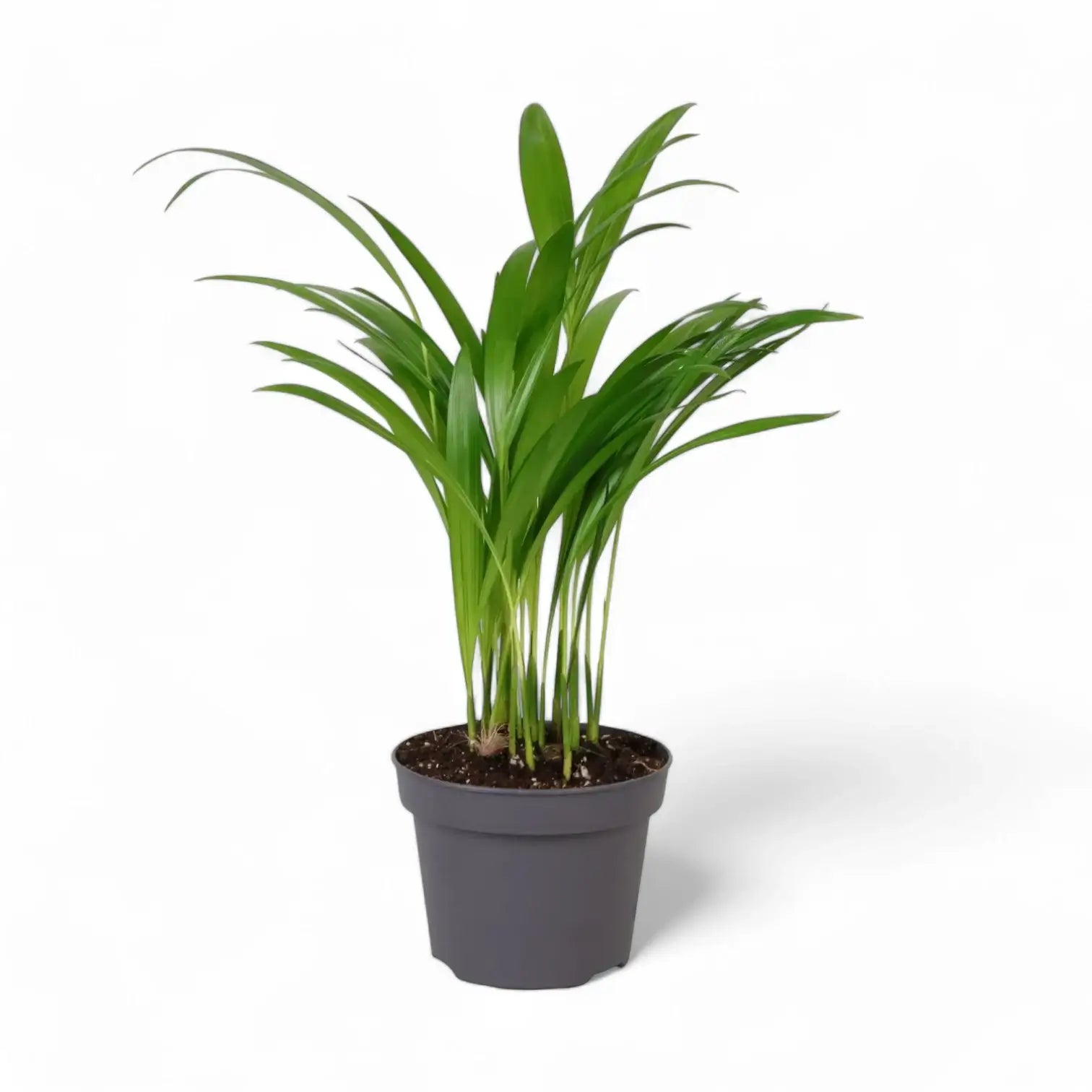
areca palm native Chrysalidocarpus lutescensChrysalidocarpus lutescens Chrysalidocarpus lutescens, still widely known under the synonym Dypsis lutescens, is a clustering palm with upright cane like stems and long, arching feather leaves. Several stems rise from the base, creating a soft, fountain shaped crown with yellow green petioles and narrow leaflets arranged along each frond. Indoors, this palm develops slowly into a broad, leafy specimen with a layered vertical outline. As the stems

Chrysalidocarpus lutescens

Chrysalidocarpus lutescens, still widely known under the synonym Dypsis lutescens, is a clustering palm with upright cane-like stems and long, arching feather leaves. Several stems rise from the base, creating a soft, fountain-shaped crown with yellow-green petioles and narrow leaflets arranged along each frond.

Indoors, this palm develops slowly into a broad, leafy specimen with a layered vertical outline. As the stems mature, they become more defined, while the fronds keep the crown airy, layered, and finely textured.

Golden cane palm details

  • Golden cane palm forming grouped yellow-green stems
  • Arching pinnate fronds with many narrow green leaflets
  • Yellow-green leaf stalks and midribs give the plant its warm tone
  • Can form a sizeable indoor floor plant over time
  • Rarely flowers indoors; mature outdoor plants may produce yellow flowers and small fruits

Eastern Madagascar origin and clumping growth

Chrysalidocarpus lutescens is native to Madagascar and belongs to the palm family, Arecaceae. In habitat and tropical cultivation it can grow as a shrub-like or tree-like palm, with multiple stems forming a broad clump. Indoors, its final shape depends on light, root space, and steady watering.

Each stem grows from a central crown. Fully brown fronds can be removed at the base, while green fronds should stay in place so the palm retains enough leaf area for new fronds. New fronds emerge from the growing points and gradually open into the palm’s feathered canopy.

Because this palm forms a clump, uneven growth is normal: some canes may sit lower while newer stems fill the centre. Turn the pot occasionally so the crown develops evenly, and keep the leaf bases open enough for inspection because pests often settle where the fronds meet the stems.

Keeping Chrysalidocarpus lutescens evenly leafy

  • Light: Use a bright, indirect position. Gentle morning or late afternoon sun suits acclimated plants, while strong midday sun behind glass can scorch fronds.
  • Watering: Keep the substrate evenly lightly moist during active growth, then let the upper layer dry before watering again. Avoid cold, saturated soil.
  • Substrate: Use an airy, well-drained palm or houseplant mix with mineral drainage material to keep the root zone open.
  • Temperature: Keep the palm warm, ideally above 18 °C, and avoid cold draughts or temperatures below about 15 °C.
  • Humidity: Average to moderate indoor humidity is workable, although very dry heated air can crisp leaflet tips. Use a humidifier where winter air becomes persistently dry.
  • Feeding: Use a low-strength fertiliser in spring and summer. Too much feed can show as yellowing or salt stress on leaflet tips.
  • Repotting: Move up one pot size when roots have filled the container, often after 2–3 years. Avoid oversized pots that keep the mix wet for too long.
  • Pruning: Remove only fully spent fronds. Cutting green fronds reduces the palm’s active leaf area.
  • Leaf cleaning: Wipe dusty leaflets gently or rinse the fronds with lukewarm water so the narrow leaflets can receive light evenly.

Frond, cane and pest checks

  • Brown tips: Often linked to dry air, irregular watering, salt build-up, or old leaf age. Check moisture pattern and flush the substrate if fertiliser salts have built up.
  • Yellowing fronds: Can follow overwatering, poor drainage, low light, nutrient imbalance, or natural ageing of older leaves. Check the root zone before feeding.
  • Mites or scale insects: Fine stippling, webbing, sticky residue, or bumps on stems and leaf bases need early inspection and treatment.
  • Collapsed stems: Soft bases usually point to root or crown stress from persistently wet, cool conditions.

Pet-safe palm status

ASPCA treats the areca palm, Chrysalidocarpus lutescens, as non-toxic to cats and dogs. Sensitive pets may still get mild stomach upset from chewing the fronds.

Accepted name and synonym note

Chrysalidocarpus lutescens H.Wendl. is the accepted botanical name for this Arecaceae species. Dypsis lutescens remains a common synonym in horticulture. The genus name refers to chrysalis-like fruits, while lutescens means turning yellow, matching the yellow tones in the flowers, stems, and leaflet midribs.

Chrysalidocarpus lutescens grows into golden cane clusters with airy fronds and a full upright palm outline.

Shipping Notes
  • Free Standard Shipping on $100+ Orders to the USA.
  • Except Preorder products are shipped in 48 hours.
  • Delivery to the USA:
  1. Standard Shipping : 3-10 business days
  • If time is of the essence, please consider selecting expedited delivery for faster service.
Exchange/Return Notes
  • We offer a 30-day return/exchange service after receiving.
  • Final sale items are not eligible for returns or exchanges.
  • To process your return/exchange, please contact us at [email protected]
  • Please click here for more details>>> Return & Exchange Policy
SKU: 46982367244

Discover Niche Categories That Outsell areca palm native

Top-Converting Item to Boost Your Average Order

4.4 ★★★★★
Based on 25 reviews
Sort
Highest Rating
Newest First
Oldest First
Product Reviews
W
Verified Purchase
William Garber
Massapequa, US
★★★★★ 5
Impressive and Comfortable
Color: Black, Style: Wireless, Pattern Name: Mouse
Only after a couple play sessions in BF6 with this mouse, I can already feel how much more precise I can be with it. My first play session was a bit rough getting used to the feel of it. It’s quickly getting more natural. I switched from a ghost keyboards m1 mouse to this. The left and right mouse clicks feel a bit more stiff than my m1 mouse which I like. Easier to avoid accidental inputs. All the other buttons feel solid with clean clicks. The mouse wheel is a very different feel with more significant bumps while scrolling, but it adds a more tactile feel being easier to control. It also has a release that lets it just spin for probably more work type use rather than gaming. It’s easy to setup, basically plug and play but a bit confusing. It comes with of course, a charging cable but the Bluetooth usb comes in some sort of housing that plugs in by the charging cable. Not sure if that is better or worse than how I have it now which is the usb receiver plugged into the back of my pc. Works fine. Looking at the Logitech website shows up to 48 hours of battery life with default lighting, or up to 60 hours with no lighting. Fully charged it showed 26 hours (25 hours now at 96%). And turning off the lighting at 96% only goes up to 28 hours. Which is plenty as I usually plug my wireless device in to charge after use. My favorite part of this mouse is how comfortable it is. It’s a bit thicker filling in my smaller hands more compared to my m1 mouse. Another nice added comfort feature is the thumb ledge. It keeps my thumb off my mouse pad, and helps with control of the mouse in high stress fps situations. The weight also help in precise aiming. My m1 mouse was 65g , the g502 is 111g plus the 1 big weight and 2 smaller weights I added making it go up to maybe 119g. Highly recommend this mouse, and will try to update if it fails prematurely.
WAS THIS REVIEW HELPFUL?YesReportShare
Reviewed in the United States on November 22, 2025
D
Verified Purchase
DeeDee Bromlow
Boise, US
★★★★★ 5
It's just a Proteus Core, but wireless. Wait... it's a PROTEUS CORE, but WIRELESS!!!
Color: Black, Style: Wireless, Pattern Name: Mouse
I've been using a Logitech G502 Proteus Core for a couple of years, and I've been wanting a wireless mouse for ages however, I had been hesitant to switch to anything else because I loved that G502 Proteus Core. Then, this mouse came out. I knew it was time to upgrade. I get a mouse that looks, feels and performs identically to my Proteus Core. No, scratch that, BETTER than my Proteus Core. Except now no more wire wrangling. No more wire catching on the edge of a table or needing to tape it down. Except the sensor is faster and better than my G502PC, and the wireless mouse is somehow LIGHTER than the wired version. What kind of space age magic is this!? When I got it at first, I was actually a little disappointed. I had been excited for this new, fancy mouse that was going to step my game up. But then I got it and it just felt exactly like my old one. It felt like nothing has changed. The wait to use it came to a somewhat anticlimactic end. But then I thought about it and realized..... IT FEELS EXACTLY LIKE MY OLD ONE. I got literally exactly what I loved before, but this time with RGB lighting and no cord! What had I expected? I got literally exactly what I wanted, and it felt like home. And the battery life, of my goodness, the battery life. I've been using this mouse since mid Early/mid-May. I probably use my mouse for about 1 to 4 hours a day, sometimes every other day depending on schedule. I charged this mouse to 100% on my first day of ownership. I haven't charged it since, and my battery currently reads 64%. Incredible. Over a month of regular and consistent use, with lighting on (at about 60-75% brightness, purple) and I haven't even gotten it to half charge. That tells me I've probably got another month or so of battery life to go! I have been BEYOND satisfied with this mouse. I only had one minor hiccup. Initially I put the wireless receiver in the rear of the tower, straight into the motherboard's primary USB 3 port. Unfortunately, I noticed that I would get occasional stuttering and hitching with the mouse cursor. After a bit I noticed that it only happened when my cell phone was on my computer desk in front of my mousepad. I relocated the receiver to the USB3 slot on my Corsair K60 keyboard, problem solved. I haven't had one stutter or hitch since. I think my cell phone's WiFi signal was causing some form of interference. I could reproduce the problem with my cell phone location every time, so I'm confident in what the issue was. BEYOND satisfied with this product. If you have ever used any of the Logitech G502 line - or mice of a similar shape - this product is an absolute NO BRAINER purchase.
WAS THIS REVIEW HELPFUL?YesReportShare
Reviewed in the United States on June 13, 2020
R
Verified Purchase
Ryan
Draper, US
★★★★★ 4
It's a good product but not quite a grand slam..
Color: Black, Style: Wireless, Pattern Name: Mouse
I've tried 15+ different mice in the last few years. It would be a bigger number if I wanted to collect them, but I mainly just try to buy the best small to medium-ish ultralight mice in search of my endgame. Won't buy a mouse without seeing reviews first anymore. However, I did main the old wired G502 for a long time before I became a snob. I still like the G502 shape, scroll wheel, and button layout very much despite the fact that it's not going to help me get high scores in aim trainers. The disadvantages caused by the weight and shape are somewhat, but not totally, made up for by the added functionality of the extra buttons, which are also fantastic for productivity. This is an overall solid product with only a few minor flaws that kept me from giving it a perfect score. The good: 1. Weight is noticeably reduced compared to the wired version. 2. The button layout every G502 fan fawns over is now on a wireless mouse. And it's genuinely a great button layout. 3. It's wireless, obviously. 4. Top-tier sensor. 5. Excellent battery life. 6. Infinite scroll wheel go brrrrr The bad: 1. Standard black teflon mouse feet. Not the worst I've seen, but Logitech does have a reputation for putting sh*tty feet on great mice. They at least improved this on the Superlight, but even those were still too thin. These aren't bad, but they could be better. 2. Click feel is substantially worse compared to the old G502. Switches are clearly not the same. Honestly would've been tempted to give this mouse 5 stars if it weren't for the clicks. They aren't heavy and ultra tactile like they were before. They're light and standard-feeling now, which isn't a deal-breaker by any stretch, but it's disappointing. 3. Price. You have to get this thing for less than $100 or it simply isn't worth it. It's a step up from the wired G502 but not to the point of it being worth 3 times as much. Even at a $95 sale price, that's still pushing it. Summary: you're sacrificing click feel and money to improve weight, obtain a nicer scroll wheel, and rid yourself of the atrocity that is the original G502 cable. You're also getting great battery life and excellent, low-latency wireless tech. It's a good mouse, but it's hard to say it's worth triple the amount of its predecessor, especially if you can replace mouse cables. Do not pay more than $100 for this mouse.
WAS THIS REVIEW HELPFUL?YesReportShare
Reviewed in the United States on July 13, 2021
J
Verified Purchase
JD.BuildsPC's
Carnegie, US
★★★★★ 5
The best mouse is the best mouse
Color: Black, Style: Wireless, Pattern Name: Mouse
I've used the wired in the past and it was my favorite mouse and after using an ASUS wireless mouse for the last 2 years I decided to go back to the Logi G502 only the wireless version this time. Connectivity is great. Disappointed that it doesn't use USB-C to charge the mouse itself, but whatever. This thing is so great and more comfortable than the last mouse I was using. That's a win All I'm saying is it's great to have this mouse again because it's hard to argue that this is the best mouse for gaming. I can't comment on battery life as I just received it but from the rest of the reviews, its has great battery life. But upon immediate use, I just can't recommend this mouse enough!!!
WAS THIS REVIEW HELPFUL?YesReportShare
Reviewed in the United States on March 22, 2026
N
Verified Purchase
Noah Meeks
Belleville, US
★★★★★ 5
Simply a good mouse.
Color: Black, Style: Wireless, Pattern Name: Mouse
Simply a great mouse, Love the layout of the buttons, it feels very natural is use.
WAS THIS REVIEW HELPFUL?YesReportShare
Reviewed in the United States on June 1, 2026

recommand products