SKU: 57922563742
spanish succulents

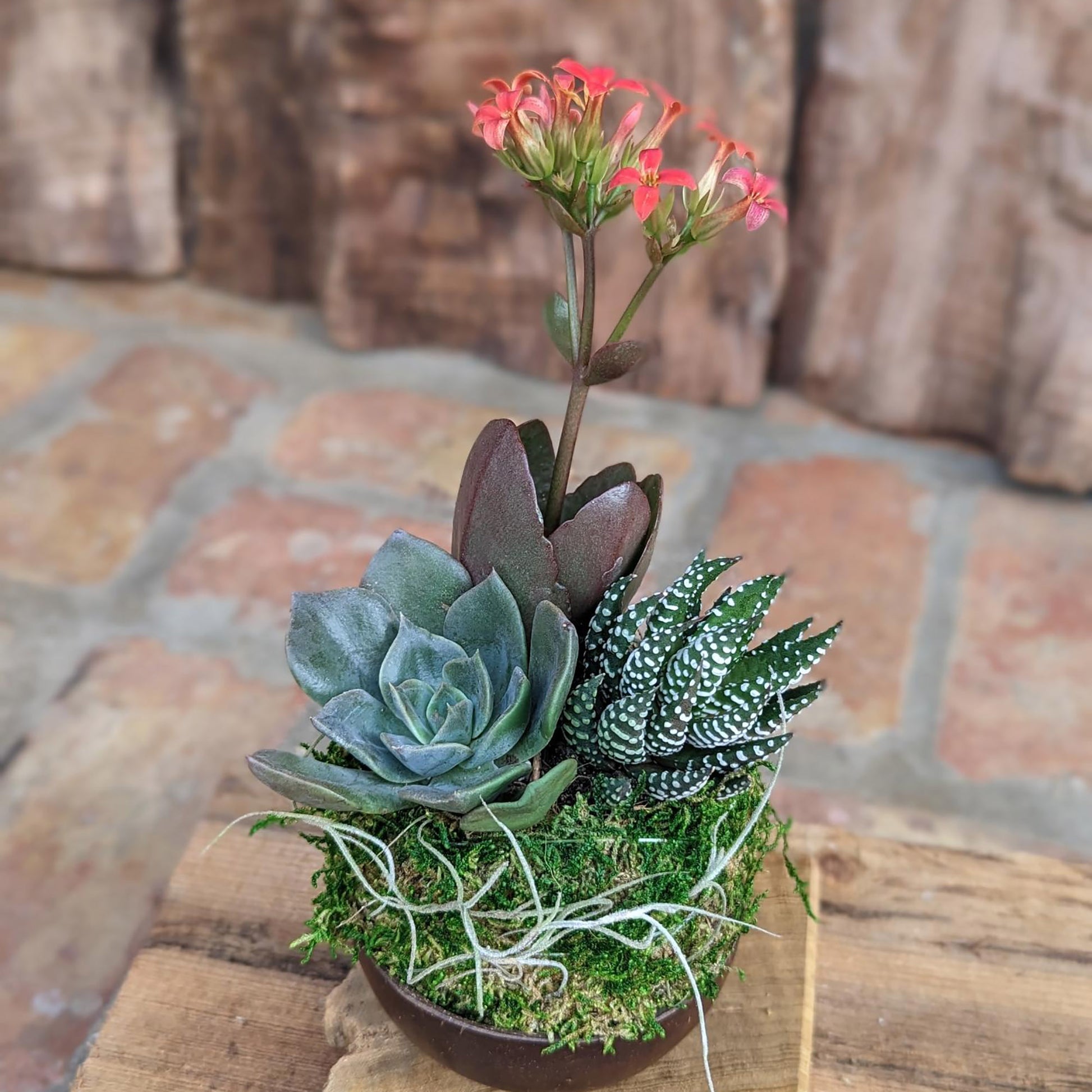
spanish succulents Blooming Live Succulent Arrangement in a Handcrafted Coconut Shell Pot

Sale price$23.99 Regular price$26.66
Save 10%

Pay in installments of $6.67 with ShopPay, AfterPay and Klarna

Shipping Estimate
USA
  • USA
  • CAN

Ships within 48 hours · Estimated delivery Sep 26 - Oct 1

Promo Codes Available:

For Your Every Summer RSVP, with Code: SUMMER15

Description

spanish succulents Blooming Live Succulent Arrangement in a Handcrafted Coconut Shell PotHandcrafted Succulent & Air Plant Arrangement Elegant Indoor Plant Gift Bring a touch of nature and artistry into your space with this unique handcrafted succulent arrangement, featuring three live succulents (Echeveria, Haworthia, and Kalanchoe) along with a Tillandsia Usneoides (Spanish Moss) accent. Designed in a sustainable kokedama moss ball, this arrangement offers a low maintenance, stylish botanical display for any home or office. Easy Care &

Handcrafted Succulent & Air Plant Arrangement – Elegant Indoor Plant Gift

Bring a touch of nature and artistry into your space with this unique handcrafted succulent arrangement, featuring three live succulents (Echeveria, Haworthia, and Kalanchoe) along with a Tillandsia Usneoides (Spanish Moss) accent. Designed in a sustainable kokedama moss ball, this arrangement offers a low-maintenance, stylish botanical display for any home or office.

🌿 Easy-Care & Long-Lasting – This arrangement thrives indoors with minimal watering, making it ideal for plant beginners and experienced growers alike.

🎁 Perfect Gift for Any Occasion – Whether for a birthday, Mother’s Day, housewarming, corporate gift, realtor closing gift, or get-well present, this handcrafted plant arrangement is a thoughtful way to bring warmth and greenery into someone’s life.

What’s Included:

Three Live Succulents: Echeveria, Haworthia, Kalanchoe – Resilient, low-maintenance, and beautiful
Tillandsia Usneoides (Spanish Moss): A delicate, natural accent
Sustainably Designed Kokedama Moss Ball: Inspired by the Japanese bonsai tradition
Approximate Size: 5 x 5 x 8 inches


🌱 Succulent & Air Plant Care Instructions

🌞 Light: Place in bright, indirect light near a window or artificial light. Avoid direct sunlight.
💦 Watering: Check the weight of the kokedama. If it feels light and dry, submerge in clean water for 5-10 minutes, then allow excess water to drain before placing it back. Do not water if the moss ball feels damp.
🌡 Temperature: Thrives in temperatures between 50-80°F.
🌱 Fertilizer: Not necessary.

With its modern, natural aesthetic and handcrafted sustainability, this succulent and air plant arrangement is a stunning addition to any home, office, or patio. Enjoy the beauty of a timeless Japanese kokedama garden, now reimagined for contemporary living!


Shipping Notes
  • Free Standard Shipping on $100+ Orders to the USA.
  • Except Preorder products are shipped in 48 hours.
  • Delivery to the USA:
  1. Standard Shipping : 3-10 business days
  • If time is of the essence, please consider selecting expedited delivery for faster service.
Exchange/Return Notes
  • We offer a 30-day return/exchange service after receiving.
  • Final sale items are not eligible for returns or exchanges.
  • To process your return/exchange, please contact us at [email protected]
  • Please click here for more details>>> Return & Exchange Policy
SKU: 57922563742

Discover Niche Categories That Outsell spanish succulents

Top-Converting Item to Boost Your Average Order

4.4 ★★★★★
Based on 21 reviews
Sort
Highest Rating
Newest First
Oldest First
Product Reviews
S
Verified Purchase
SGT_Clinton
Pawtucket, US
★★★★★ 5
Great color saturation
I have only used this a couple of times and was concerned about the dull colors when it printed out. But the listing warns you about that so I went ahead and pressed it. Perfect! Bold colors and high quality images. Plus, filling my printer only took a little over half the bottles. Great value for the money and I will definitely be ordering again.
WAS THIS REVIEW HELPFUL?YesReportShare
Reviewed in the United States on December 28, 2020
L
Verified Purchase
Lourdes L.
Fort Morgan, US
★★★★★ 5
Superior Customer Service; 100% prefect and functional, BUT...
Number of Items: 2
This product fits perfectly, after all it's just a simple piece replacement. The big deal is the counter reset, and this is where Customer Service outstands. People complaints about the difficulty of following the reset instructions, and with reason, as they are lengthy. But that is the printer you have, that is Epson's product. You either send the printer to them and pay the premium fee, or do it yourself, but you have to play their game. This is not Seller's fault; on the contrary, Seller put all their effort to include each and every steps you need to fix the problem, no matter what printer model you have. They included most, If not all, printer models you may have. They provided super detailed instructions to ensure your success; keys where needed, no keys where not needed, printer drivers location to download and ensure the resetter will work and, best of all, support if you need it. You have to contact them through Amazon asking for the user's manual (instructions; yes, the lengthy ones), the reset program and the reset keys if applicable (this depends on you printer model; some need the reset keys, some do not). And this is where you get concerned: When are they going to answer, now that my printer is locked? You think (I did): it is weekend, they will probably answer Monday or maybe Tuesday (after all, that already have the money, why care?). Well, I was absolutely wrong, they answered during the weekend with all necessary to have the printer back, up and running; Thank You. Some tips: 1. There is nothing wrong with the software (if got from a reputable source, and they for sure are), so get it without concerns. 2. Get the printer driver as advised; it is quite probable that the software will not work if you don't install the correct driver; don't forget to restart the computer after the driver installation. 3. Make sure your printer is set up with the USB connection Enabled (mine was disabled and that caused a headache: ET-4800). 4. When the resetter instructions call for Initialize the Counters, don't do it, not yet; select Check instead, just above Initialize. If you cannot read (Check) the counters, you will not be able to Initialize them: fix the connection problem first (make sure you installed the printer driver and RESTART the computer, make sure you enabled the USB connection in the printer, and make sure the usb cable is correctly connected). It's not Seller's fault to make long and complicated instructions, that is actually their effort to make sure you have all you need to succeed. Buy with confidence, this works: if you cannot make it work, you may find someone you trust to help you out (your kids or grandkids know a lot for sure), or just let Seller know, they are willing to help you out. Best regards.
WAS THIS REVIEW HELPFUL?YesReportShare
Reviewed in the United States on November 10, 2025
D
Verified Purchase
Dee
Cuba, US
★★★★★ 5
Perfect for ET-4700
Number of Items: 4
This is exactly what I needed and they fit perfectly with my ET-4700. Also, no mess! I will definitely purchase these again.
WAS THIS REVIEW HELPFUL?YesReportShare
Reviewed in the United States on May 31, 2026
B
Verified Purchase
Banjo
Lake Worth, US
★★★★★ 5
Works great for ET-2720 - no key needed for this model either.
Number of Items: 2
This worked great for my ET2720, and the price is exceptional compared to what you could pay to have Epson complete this process. I’ll admit that it took me a while to complete it, maybe 25 minutes, but that is because I was being cautious. When I do it again, it would likely take 5-10 minutes having already done it once. I did read a helpful review and followed some of their advice, and that might have added some extra time. Not sure if it is important to download the driver that the .zip file directs you to, but it is from Jan 2025 and is outdated so you might be regressing to an older driver version in order to complete this process. I’ll add some things to note: The driver software in the .zip - it is just a list of URLs to an Epson driver download for different printer models in an Excel document. Make sure you have a way to open a .xlsx file. You don’t need a reset key for all printer models. I didn’t need one for my ET-2720. Each download from their website has different instructions in the .zip - so they should tell you if you will need one or not and you can contact them ahead of time to get it. That’s another thing. Don’t waste your time with the instructions in the box. Just use them for the simple ink pad replacement steps and how to download the .zip from their site. Then just follow the .pdf that is included in the .zip from there on out. Solid choice for this solution!
WAS THIS REVIEW HELPFUL?YesReportShare
Reviewed in the United States on December 11, 2025
G
Verified Purchase
Guillermina Fowler
Lexington, US
★★★★★ 1
No good
Number of Items: 2
Didn’t work for my printer
WAS THIS REVIEW HELPFUL?YesReportShare
Reviewed in the United States on May 3, 2026

recommand products