SKU: 65525867634
prickly pear cactus delivery

prickly pear cactus delivery Prickly Pear Cactus 'Opuntia sulphurea' - Fast Delivery

Sale price$21.21 Regular price$23.57
Save 10%

Pay in installments of $5.89 with ShopPay, AfterPay and Klarna

Shipping Estimate
USA
  • USA
  • CAN

Ships within 48 hours · Estimated delivery Oct 1 - Oct 6

Promo Codes Available:

For Your Every Summer RSVP, with Code: SUMMER15

Description

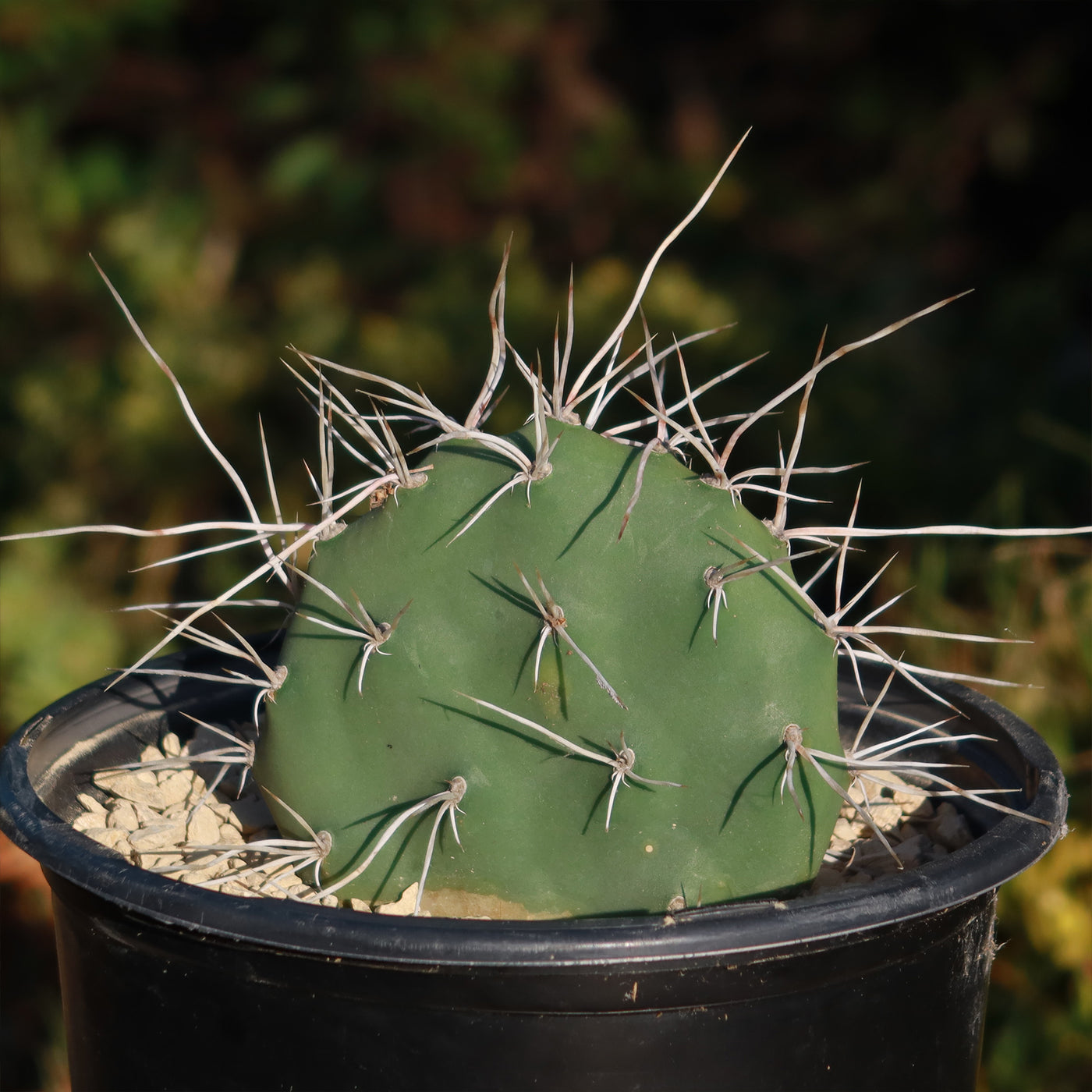
prickly pear cactus delivery Prickly Pear Cactus 'Opuntia sulphurea' - Fast DeliveryIntroducing the fabulous Prickly pear cactus, also known as 'Opuntia sulphurea,' a vibrant member of the Opuntia genus! But don't let its prickly exterior fool you these prickly pears varieties are surprisingly easy to care for and can even thrive in less than ideal conditions. Native to South America, this vibrant low growing shrub spreads out like an enthusiastic explorer. It has paddle shaped stems that are covered in spines and small, hair like

Introducing the fabulous Prickly pear cactus, also known as 'Opuntia sulphurea,' a vibrant member of the Opuntia genus! But don't let its prickly exterior fool you - these prickly pears varieties are surprisingly easy to care for and can even thrive in less-than-ideal conditions.  

Native to South America, this vibrant low-growing shrub spreads out like an enthusiastic explorer. It has paddle-shaped stems that are covered in spines and small, hair-like structures called glochids. The stems are typically blue-green in color and can grow up to 12 inches long and stretch their arms up to an astounding 6.6 feet in diameter.  Its joints are thick, oblong to obovate in shape, with a smooth glabrous texture that's simply irresistible.  Sometimes they flaunt a stunning shade of purplish hues but usually stick with their trusty green attire. But wait, there's more!  

Brace yourself for the spines that are dense, stiff, and initially whitish but evolve into hues ranging from yellowish all the way to brownish or ravishing red as they mature. It produces bright yellow prickly pear flowers in the spring and summer.

This Opuntia produces edible fruit in the fall, and it is commonly used in Mexican cuisine and can be eaten raw or cooked. In addition to its culinary uses, the prickly pear cactus has a number of medicinal benefits and is used in traditional medicine to treat a variety of ailments.  

The Opuntia sulphurea is a popular cactus for gardeners because of its unique appearance and low maintenance requirements.

Watering Needs

Many cacti, like the prickly pear cactus, thrive when cared for properly by using the "soak and dry" technique. Allowing the soil to completely dry out in between waterings is crucial because overwatering can lead to the roots rot. During the summer months, you should water your cactus once in 2-3 weeks, and during the winter months, you can reduce watering to once a month.  

It's also important to note that the Opuntia sulphurea is a drought-tolerant plant, meaning it can survive extended periods of time without water. In fact, overwatering is one of the most common causes of death for this prickly cactus. When watering your prickly pear, it's best to use a watering can or a hose with a soft spray nozzle to avoid damaging the stems or flowers. Remember, it's a good idea to avoid getting water on the stem of the cactus, as this can cause damage or discoloration.

Light Requirements  

The prickly pear Opuntia sulphurea prefers bright, direct sunlight, and it's important to place it in a location where it can receive at least six hours of sunlight per day. If you're growing your opuntia cactus indoors, it's a good idea to place it near a sunny window or under a grow light.  

It's also important to note that this prickly pear can tolerate some shade, but it won't thrive in low-light conditions. If you notice that your cactus is growing tall and leggy, it may be a sign that it's not getting enough sunlight. In this case, you should move it to a sunnier location or provide additional artificial light.  

Additionally, it's important to protect your Opuntia sulphurea from extreme heat or cold. If you live in an area with hot, dry summers, you should provide some shade for your cactus during the hottest part of the day.  

Optimal Soil & Fertilizer Needs

The prickly pear cactus prefers well-drained soil, so it's important to use a cactus mix that contains sand or perlite to help with drainage. You can also add some gravel or pebbles to the bottom of the pot to help with drainage. Here at Planet Desert, we have a specialty-formulated cacti potting mix that contains 5 natural substrates and organic mycorrhizae to promote the development of a strong root system that helps your cactus to thrive.  

As for fertilizer, it's best to use a low-nitrogen fertilizer specifically designed for cacti. You should fertilize your Opuntia cactus once a year during the growing season (spring). It's important not to over-fertilize your cactus, as this can cause damage to the roots or even kill the prickly pear plant. 

Hardiness Zone & More

Typically grown in hot, arid desert regions, the opuntia cactus thrives indoors in warm, dry surroundings. If you live in USDA regions 9 to 11, you can also grow these cacti outdoors year-round, but they are not cold- or frost-tolerant, so you should plant them indoors or put them in a pot and move them indoors during the winter if you live outside of these regions. Keep your prickly pear away from cold, drafty windows and air vents if you are growing it indoors in a cold climate. 

In terms of humidity, the prickly pear cactus is a drought-tolerant plant and can tolerate dry conditions. However, it's important to avoid exposing your cactus to extreme humidity or moisture, as this can cause damage or disease. 

We think you will love this plant – order your very own Opuntia sulphurea - Prickly pear cactus today and start enjoying its beauty in no time! 

Shipping Notes
  • Free Standard Shipping on $100+ Orders to the USA.
  • Except Preorder products are shipped in 48 hours.
  • Delivery to the USA:
  1. Standard Shipping : 3-10 business days
  • If time is of the essence, please consider selecting expedited delivery for faster service.
Exchange/Return Notes
  • We offer a 30-day return/exchange service after receiving.
  • Final sale items are not eligible for returns or exchanges.
  • To process your return/exchange, please contact us at [email protected]
  • Please click here for more details>>> Return & Exchange Policy
SKU: 65525867634

Discover Niche Categories That Outsell prickly pear cactus delivery

Top-Converting Item to Boost Your Average Order

4.9 ★★★★★
Based on 14 reviews
Sort
Highest Rating
Newest First
Oldest First
Product Reviews
H
Verified Purchase
Hawk R.
Omaha, US
★★★★★ 5
Handles Photo-Quality Prints, Versatile Connectivity
Color: Black, Style: ET-2800-B, Pattern Name: Printer, Color: Black, Style: ET-2800-B, Pattern Name: Printer
I've had this printer for a whole year now. I was on a severe budget, looking for a photo-quality printer that didn't require Wifi in this digital age- because I quite frankly can't afford my own Wifi connection. My rink-a-dink laptop had to be set up with the software at my library, and an extra cord purchased. All that said, I mostly print from my phone, because the software app is a bit easier to ensure that I get the highest quality setting. Laptop loves to be a snot about it. The blutooth feature, or "wifi direct", has a way about it, and as soon as you figure out what it wants, it gives minimal problems. It functions exactly as if a printer had wifi on it, believe it or not. What sold me on this model was the ability to do all of that, and adjust for different situations, seeing as other brands DEMAND constant wifi connectivity (lookin' at BROTHER, maybe Canon, too), and the long lasting ink tanks- I've printed hundreds of pages, and being a gothic/horror artist, at least a good part of the time, black is the only color even half gone. What horrified me the most about printer-shoping dropping a lot of money (hundred plus is a lot over here, man) and not getting the prints to look like my work. Well, fear not. The attached pictures are why I made this review, to hopefully ease the anxiety of others. I make digital paintings, and use high DPI for high quality, and also the cutest micro-stickers you've ever seen. Prints come out clear, even if they can sit in the tip of my finger. Yes, there are probably better printers. Maybe they're faster, and have even better connectivity, and have more bells and whistles. I specifically did not want to pay for those things, so, I'm very happy there's options. It's not perfect, no, because every now and then, I get what I call a "special edition", where my printer has decided to multi-color barf out the last third of the page. One time it randomly printed in black and white. Well, that's no big deal, my stuff tends to look great in monochrome. Every now and then I get a low quality print; things just look a bit fuzzy. I'm not happy about that, but, you clean the heads, and print something simple and toony, and it has never done it twice in a row. Alignment has been off only one time, and I put the printer away after every session. It occurs to me that people pay good amounts of money for printers that do that sort of thing anyway, so... Printers gonna printer, no matter where you try to hide. Overall, I'm happy and relieved. I hope it lasts me a good long time. (Streetratt on Kofi, by the way.🖤 )
WAS THIS REVIEW HELPFUL?YesReportShare
Reviewed in the United States on March 24, 2026
M
Verified Purchase
Micah
Los Angeles, US
★★★★★ 5
Amazing value and performance — perfect everyday home printer!
Color: Black, Style: ET-2800-B, Pattern Name: Printer
After lots of research and comparing ink costs, I finally purchased the Epson EcoTank ET-2800 Wireless Color All-in-One Cartridge-Free Supertank with Scan and Copy and it has been one of the best tech investments I’ve made for my home setup. Whether I’m printing documents, photos, homework, or creative projects, this printer delivers consistently reliable results without the usual stress over ink costs. Right out of the box, setup was surprisingly easy. Epson’s app guided me through the wireless connection, and within minutes the printer was connected to my Wi-Fi and ready to go. The initial filling of the ink tanks took a few extra minutes, but the included bottles were clearly labeled and simple to use without mess. The print quality has exceeded my expectations for an all-in-one home printer: - Documents: Crisp, clean text — perfect for school assignments, work documents, letters, and recipes. - Photos: Bright, colorful prints with decent detail (especially when using good-quality paper). - Graphics & Crafts: I’ve printed worksheets, planner pages, labels, and even small art pieces — and everything looks sharp and vibrant. - The speed is solid for its class. It’s not a professional office machine, but it doesn’t feel slow for everyday use. Cartridge-Free Ink — Game Changer This is the real highlight: - Cartridge-free Supertank System: Instead of tiny cartridges that run out in no time, this printer uses large refillable ink tanks — which means massive savings on ink long-term. - Low Ink Cost: You really feel the savings after your first few refills. I used to go through cartridges quickly, but now I only refill every few months — and even then, it’s affordable. The included ink bottles provide a ton of pages, and you can easily track levels through the transparent tanks so you’re never caught off guard. The wireless setup works smoothly. I can print from: - My phone (via Epson app, AirPrint, or Google Cloud Print) - My laptop or tablet - Directly via Wi-Fi without cables No more plugging USB in every time — super convenient. The scanner is quick and easy to use: - Scan photos - Scan documents straight to email or phone - Make copies without touching a computer The scan quality is clear and accurate — ideal for digitizing receipts, forms, or school worksheets. Pros: - Huge savings on ink long-term - Excellent print quality for text and color graphics - Easy wireless setup and mobile printing - Transparent tanks — see ink levels at a glance - Scanner and copier work well for everyday tasks - Quiet operation compared to older printers Minor Notes - Initial setup takes a bit longer because of ink filling — but it’s worth it. - Photo prints are good for casual use, though super high-detail photography will still look better with dedicated photo printers or labs. - No automatic document feeder (ADF) — so multi-page scanning requires manual pages. The Epson EcoTank ET-2800 has transformed my printing experience. It’s affordable to run, produces great everyday prints, and the wireless features make it super convenient for the entire household. If you’re looking for a home printer that won’t drain your budget on ink, this one is absolutely worth it. Whether you’re printing school documents, work files, planners, photos, or craft projects, this printer does it all with ease — and saves you money over time. Highly recommended for home use — practical, efficient, and budget-friendly!
WAS THIS REVIEW HELPFUL?YesReportShare
Reviewed in the United States on February 5, 2026
P
Verified Purchase
pease4pod
Battle Creek, US
★★★★★ 5
Excellent Investment!
Color: Black, Style: ET-2800-B, Pattern Name: Printer
I have had this printer for two years now. I purchased it to do invitations and signs for my Daughter's baby shower. I designed an invitation, printed more than sixty copies with address labels, return address labels, numerous signs, games and raffles tickets. I used it again for the Baby's 1st Birthday same amount of items. I have not had to fill the colored ink in over 2 years. I have filled the black. My husband also uses it for work and I've printed several other projects including pictures. Everything has always exceeded my expectations. For the price you get excellent quality. I find the software easy to use and update.
WAS THIS REVIEW HELPFUL?YesReportShare
Reviewed in the United States on June 11, 2026
T
Verified Purchase
Tom B
Houston, US
★★★★★ 5
Inkjets have come a long way
Pattern Name: Printer, Style: ET-15000
Just a lot to like about this printer and nothing I don't like. Very capable for the price. I do mostly black and white printing, rarely print photos. (This will supposedly do a credible job of photo printing too but I haven't tried it). If you want professional caliber photo printing, you probably want the Epson 8550 which is similar to this, a bit more expensive, but does 6 color printing. If you are doing more like every day business printing the 15000 might be a better choice because it's built more for speed. The tank system means I can just replace the black because I use it a lot. The black ink tank is double size of the others and based on my experience so far, I think I'll easily get over a thousand pages on the standard-vivid setting which is very strong black but still relatively high speed printing. Given that the black ink bottles are under $30 I think the cost per page will be comparable to laser. The booklet/pamphlet printing can be complicated to work out with layers of PDF software and the Epson printer driver. But once you work it through, it's super capable. I've printed a lot of 12 x 18 double-sided for booklets and the paper handling has been flawless. (It can duplex automatically for 8 1/2 x 11 but for other sizes you have to manually duplex, which you can do by printing back/front or even/odd.) It's not as fast as a laser printer but it's pretty fast -- inkjets have improved so much.
WAS THIS REVIEW HELPFUL?YesReportShare
Reviewed in the United States on April 16, 2026
L
Verified Purchase
Loleta Harlan
Grantham, US
★★★★★ 5
Perfect Printer for My Small Business
Pattern Name: Printer, Style: ET-15000
I purchased the Epson ET-15000 for my crafting and apparel business and have been very pleased with its performance. The print quality is excellent, colors are vibrant, and the large ink tanks help save money over time. It handles larger print sizes with ease and has become an essential part of my workspace.
WAS THIS REVIEW HELPFUL?YesReportShare
Reviewed in the United States on June 3, 2026

recommand products